
Don’t like traditional WordPress hosting?
Consider using a modern WordPress cloud hosting control panel with unmanaged cloud servers. It also helps you to manage multiple servers and websites and connect easily with third-party services. They used to be technical, but now they’re user-friendly and optimized, requiring no adjustments.
Traditional control panels, such as cPanel and Plesk, are complex and not designed for small servers; you have to spend time learning to use their features.
And I don’t like cPanel; it’s outdated and cluttered with tons of unrelated admin settings. I only love UIs that are visually appealing and simple to use.
Modern control panels typically prioritize uncomplicated server configuration. They fit the user’s needs; you can select Nginx, Apache, or LiteSpeed, with dev features.
All right, here are modern WordPress cloud hosting control panels compatible with popular providers such as Vultr, Linode, DigitalOcean, AWS, and Google Cloud.
1. Ploi.io

Ploi is an open-source cloud server management panel and is my favorite because it is highly customizable and built for real devs. I like its uncluttered UI, which is clean and devoid of unrelated features (but new users may find it confusing).
In addition to standard servers, Ploi offers different server types, including storage, Elasticsearch, load balancers, Valkey, and Docker. Ploi has positive and negative aspects.
The downside is that Ploi is better suited to Nginx and incompatible with LiteSpeed. They now offer OpenLiteSpeed with paid plans in the App Marketplace. Moreover, you can’t use Apache, but that’s not a major issue because it’s outdated.
There’s also a significant drawback: the free, basic, and even Pro plans lack essential features such as team and file management, a firewall, and monitoring.
To use features like site cloning, server insights, automatic backups, and server monitoring, you need the Pro plan. The unlimited plan provides access to all features. However, the free version offers plenty of features for normal users and developers.
Key WordPress Features:
Ploi isn’t just a WordPress hosting control panel; it’s a server management platform for all kinds of servers. It also offers multiple features that integrate easily with WordPress. You can install SSL with HTTP/3 (or use your DNS provider for SSL). When you connect to a server, Ploi automatically installs Nginx, fail2ban, MariaDB, Redis, UFW, and SSH.
You can restart, stop, or disable them individually. They often update PHP versions; you can choose the latest or an older version.

Ploi has updated WordPress’s features and added a dedicated section where you can install, update, or uninstall themes and plugins. You can easily clone the site, turn off XML-RPC, and set up a cron job without hassle.

While Ploi can be challenging for beginners, its simple interface makes it easy to install or remove features. The free version lets you manage the site easily, but it lacks a file manager, which can make troubleshooting more difficult. You can, however, connect it to third-party software, such as FileZilla.
Highlights:
- A free version with plenty of features.
- Features and services beyond WordPress.
- Highly customizable, allowing you to make tons of tweaks.
- Recent server stacks: Redis, fail2ban, Nginx, Docker, MariaDB, etc.
- Supports numerous server types (load balancers, databases, containers).
- You can’t use LiteSpeed or Apache; you’re stuck with Nginx.
- The Free, Basic, and Pro plans don’t include certain basic features, so you need the Unlimited plan to access them all.
2. xCloud

What I said earlier isn’t relevant now, since xCloud is so involved. They are expanding the service beyond WordPress and redesigning both the site and the control panel.
xCloud is a modern hosting control panel focused on WordPress but now supports other apps, such as Laravel, Node.js, n8n, and AI tools. xCloud offers managed hosting in its admin panel and seems to use Vultr for server management.
Still, you can integrate a server with any provider and use stacks such as LiteSpeed or Nginx. They offer flexible plans, but the free version lacks many features.
Even using a budget VPS provider, I achieved decent performance with xCloud. There are several reasons I like this cloud panel…
- Super-fast panel, like a mobile app.
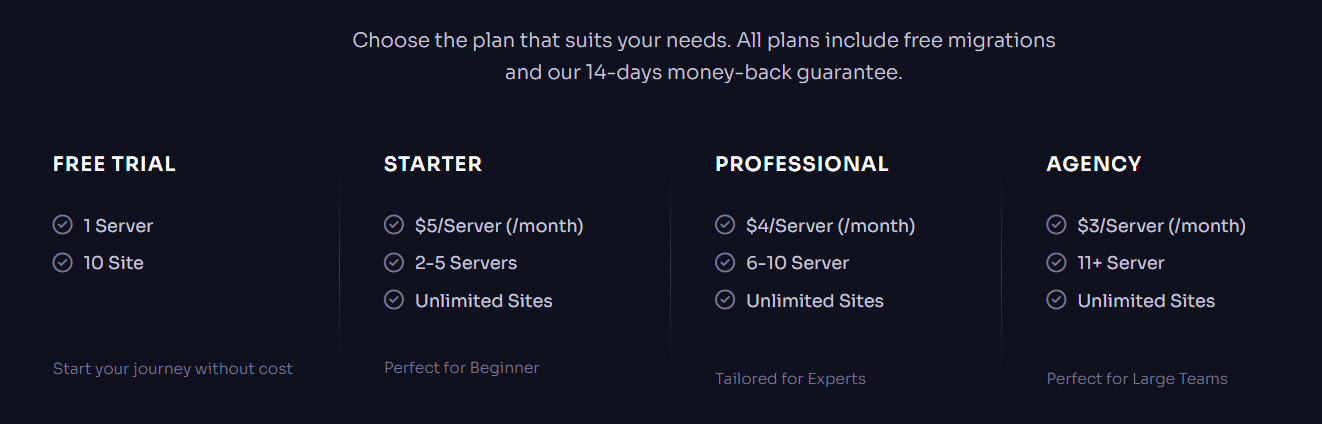
- Free plans allow you to host up to 10 websites on a single server.
- The file manager (something most cloud panels lack).
- It includes an event log, so you can see all activity in real time.
- Automated backups to Amazon S3, Cloudflare R2, etc.
- On the xCloud account, you can add or remove users, including yourself. Freelancers and service providers will benefit in particular.
- It now offers several new features, including Cloudflare integration, full-page caching, and complete server migration.
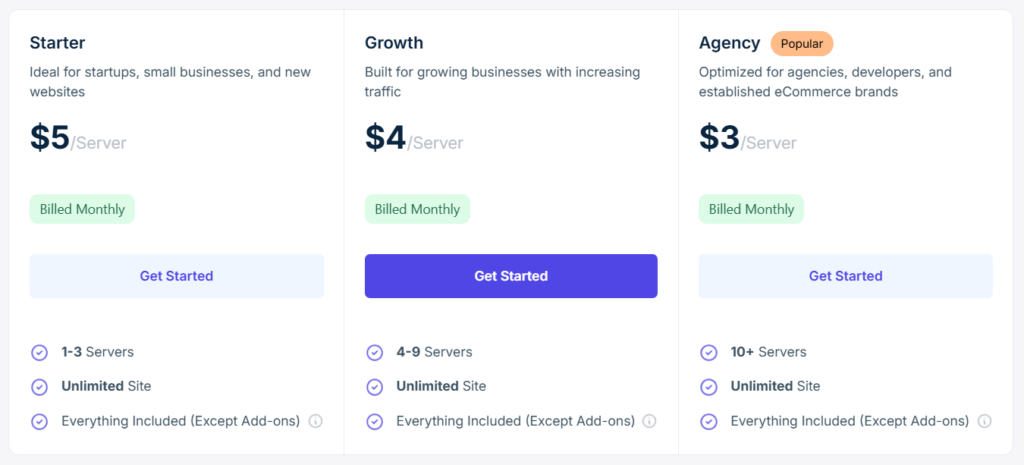
The entry-level plan starts at $5 per month per server. If you have high traffic or manage multiple servers, you can switch to the agency plan for $3 per server.
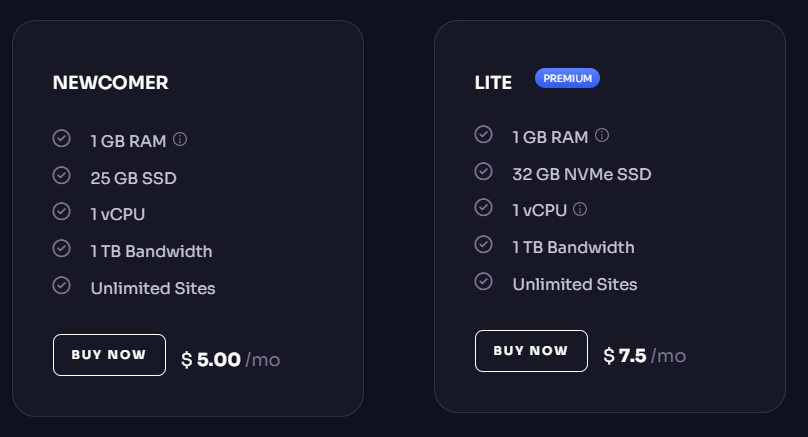
xCloud Managed Hosting starts at $5 per month. The Lite plan includes 1 GB of RAM, 25 GB of SSD storage, 1 CPU, 1 TB of bandwidth, and unlimited sites. Cloudways’ Vultr high-frequency entry-level plan costs $16, while xCloud offers it for $7.50.
Even with its managed hosting, it remains more affordable than others. You can easily set up with Cloudflare CDN. So far, xCloud has received positive reviews on Trustpilot and others. There are also some negative reviews about terrible support.
I’m pretty cool with using xCloud, but it does have some downsides. The biggest bummer is that support takes forever to respond. Now that they have addressed the earlier issues, xCloud offers a complete hosting solution for ALL users. I see they’re still getting things ready, and I’m looking forward to seeing things improve.
Highlights:
- Tiny file manager.
- Slow updates on some features.
- Full-page caching with Cloudflare.
- I’ve had bad customer service
- Limited options for data centers in managed xCloud.
- Magic Login: Access your WordPress admin without a password.
- The free plan includes essential features, and the premium plans are affordable.
3. RunCloud

Several new players are offering modern user interfaces and robust features. I still think RunCloud is an ideal server management tool for multiple CMSs. But it’s unlikely to appeal to novice or inexperienced users. It’s affordable, offers more features, has an improved interface, and performs better than most server management panels.

The clear interface makes it easy to manage server settings, but RunCloud is not ideal for entry-level users; it is best suited for pros. I like the features, but it can be a bit tricky for beginners. It’s more for developers than average site owners. Multiple server stacks for different applications work with any type of cloud VPS.
The panel offers LiteSpeed, making it an ideal choice for a LiteSpeed host. RunCloud includes multiple server admin features that make it ideal for Nginx users.
RunCloud supports most CMSs and frameworks, even custom PHP apps, and the built-in file manager makes it easy to access your application files.
Compared to other WordPress cloud hosting control panels, such as SpinupWP and FlyWP, RunCloud is an advanced panel designed for real users.
Highlights:
- An easy-to-use file manager.
- Integrated caching: Nginx FastCGI.
- It’s a bit pricey compared to alternatives.
- Developer-friendly panel with tons of features.
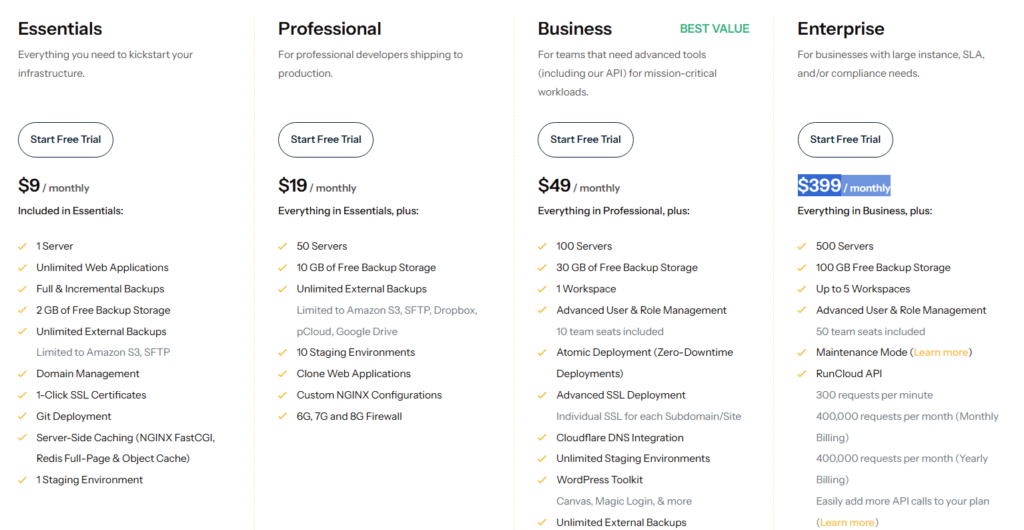
- Depending on the plan, it offers up to 30 GB of backups.
- Uncomfortable for beginners (No entry-level support).
4. FlyWP

FlyWP is a Docker-based cloud server control panel explicitly built for WordPress, and you can easily connect, deploy, and manage your WordPress sites on cloud servers.
With FlyWP, each site runs in its own Docker container, ensuring security and isolation, which I think is the main difference from other server control panels.
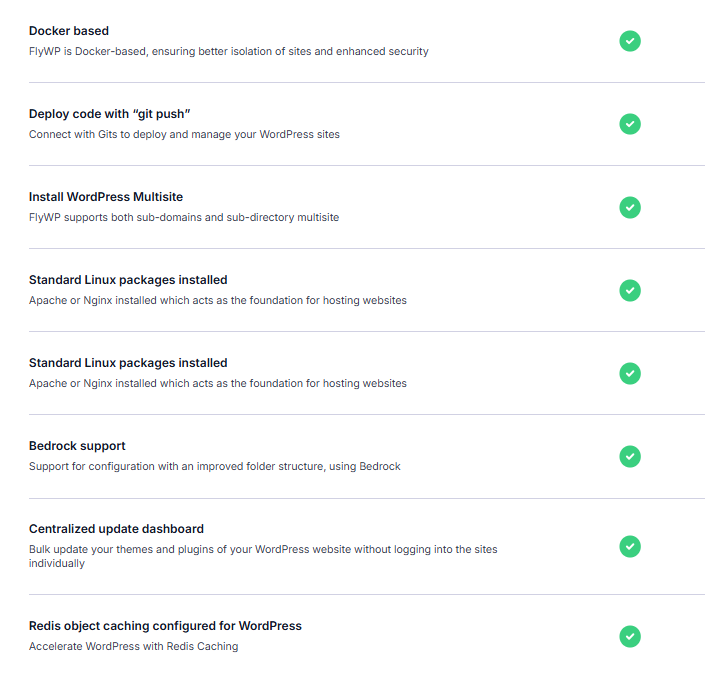
It lets you deploy DigitalOcean servers without paying an additional charge. You can use Nginx or OpenLiteSpeed, each with different caching layers.
FlyWP has a handy WordPress plugin called “FlyWP Helper” that makes it easy to interact with the panel. It speeds up your website by removing unnecessary elements like dashboard widgets, scripts, pingbacks, emojis, comments, and link classes.
The panel features a simple UI for managing files/folders on the server. It includes Cloudflare integration, team roles, batch updates, and other features.
You can easily migrate or clone your WordPress site to a different server/account. But it can feel bloated because it uses more server resources than more modest panels.
Highlights:
- Password-free access with Magic Login
- A decent free plan for a single website
- Better security system with Patchstack
- Easily accessible file manager in the control panel
- Not intended for apps besides WordPress
- Team roles are exclusive to the business plan.
5. ServerAvatar

ServerAvatar is a simple cloud server management panel that lets you easily manage your cloud VPS using modern software and a user-friendly interface.
It is an India-based hosting control panel. I’d like to compare this to RunCloud, but its UI is more user-friendly and lets you choose any VPS from the dashboard.
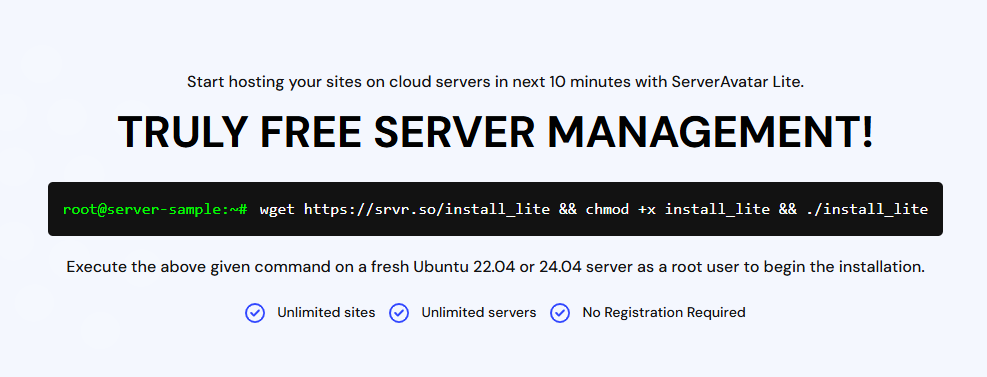
You can try ServerAvatar for free to access its basic features. They clearly outline the fees, and starter plans cost $10/month and include all features for up to 5 servers. Supports OpenLiteSpeed and other modern server stacks with WordPress themes.
However, if you’re an agency or small business, Pro is ideal at $25 and offers features like team management. ServerAvatar now offers internal cloud hosting, like xCloud, in partnership with DigitalOcean and Vultr, and is much cheaper than Cloudways.
Key Features:
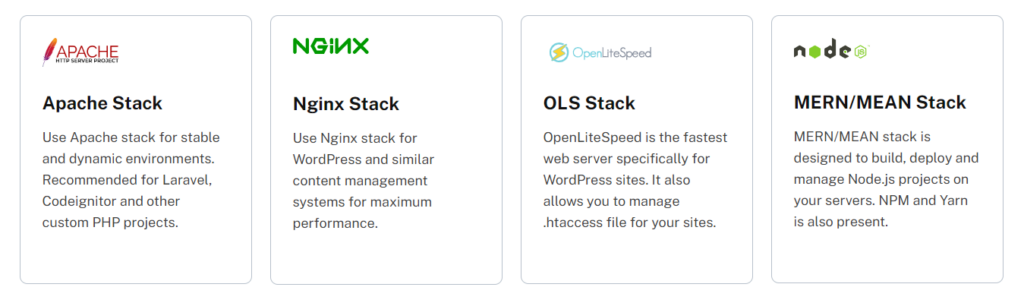
With ServerAvatar’s simple setup, you can install WordPress, set up Git deployments, and run Node.js, Joomla, and other PHP apps. It allows you to install Apache, Nginx, OpenLiteSpeed, Redis, and MariaDB on Linux. ServerAvatar has fine security features and supports third-party services such as GitHub, Telegram, Slack, and Cloudflare.
If you choose the ServerAvatar PRO plan, you can GET all features, including team access, and it is ideal for agencies managing large servers.
It is a hybrid control panel that lets you choose between managed and unmanaged. Includes a server monitoring tool that shows your server usage in real-time. Although it lacks several features, its friendly UI and pricing make it worth trying.
Highlights:
- White-label for the business plan.
- Multiple security settings for your website.
- No hybrid stacks like Nginx+Apache.
- Compatible with OpenLiteSpeed and the latest server stacks.
- It is expensive, and renewal prices can be high.
- Backups are unreliable—you need Google or S3 for remote backups.
6. SpinupWP

SpinupWP is a hosting control panel designed specifically for WordPress. Its interface makes it seem that anyone can provision a server and run sites.
SpinupWP is ideal for people who require minimal maintenance. You can connect to any VPS or dedicated server, but it’s easiest with DigitalOcean or Linode.
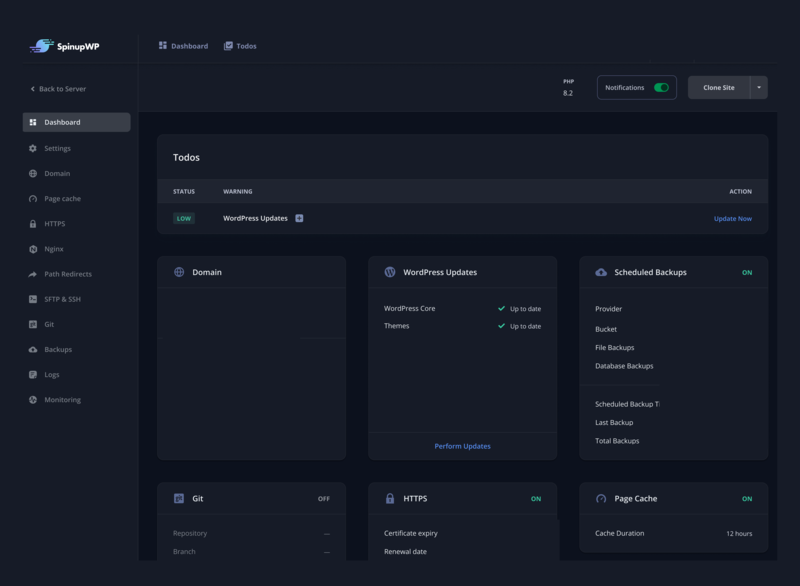
Despite its decent performance, the user interface isn’t ideal because it lacks a file manager, a PHP admin, and other essential features. Not much to see in the UI.
But here’s the thing… Prices: I’m not sure why they charge so much, given the many cheaper control panel options. The panel is significantly pricier than alternatives.
You can choose between personal and team plans. The personal plan offers unlimited websites and one server for $12 per month. Each additional server is $5 per month.

Key Features:
SpinupWP focuses solely on WordPress, with features that integrate seamlessly with the platform. You can pick a subdomain or subdirectory; enabling a multi-site network is as simple as flipping a switch while creating a new site.
The UI is clean and doesn’t include unnecessary features, making it easy to manage a cloud server. But it lacks SOME features, such as file manager and a PHP admin, due to security concerns. Even managed hosts like FlyingHost have those features.
Full-page caching via FastCGI can enhance your site’s performance compared to traditional caching plugins. For enterprise-level caching, you can also use a CDN such as FlyingCDN. Built-in features include a firewall, automatic patch updates, SSL, etc.

It lacks modern features, needs more dev-friendly settings, and requires significant effort to locate the database and set up servers outside DigitalOcean.
If you opt for DO with pre-installed Nginx and FastCGI, setup is brief; however, you cannot use LiteSpeed or Apache servers.
Yes, SpinupWP is a reliable WordPress cloud hosting control panel, but it has limited features that may not meet developers’ needs. Also, the pricing is OK for 1 server, but it rises sharply with multiple servers.
Highlights:
- Quite expensive.
- You get full root access.
- Built-in server-side caching.
- Incompatible with LiteSpeed and lacks many advanced features.
- WordPress-specific features and one-click WordPress admin login.
- Setting up cloud servers can be difficult, except for DigitalOcean.
7. ServerPilot

ServerPilot is another solid dashboard for managing cloud servers, and it may look like a mediocre panel. Yet, its simple UI makes it easy for both beginners and DEVS.
Although it’s not as modern as xCloud, it can handle all kinds of VPS with Nginx/Apache. It also has drawbacks, including no free version and no LiteSpeed.
For instance, it tends to be less expensive than SpinupWP, but you will need at least a business plan to handle it properly. It also charges a separate fee per application, so you will need to pay for each app you install, in addition to server charges.
The user interface feels a bit bare and offers only a few features. It lacks caching and optimization features, so you need a PRO plugin like FlyingPress for WordPress.
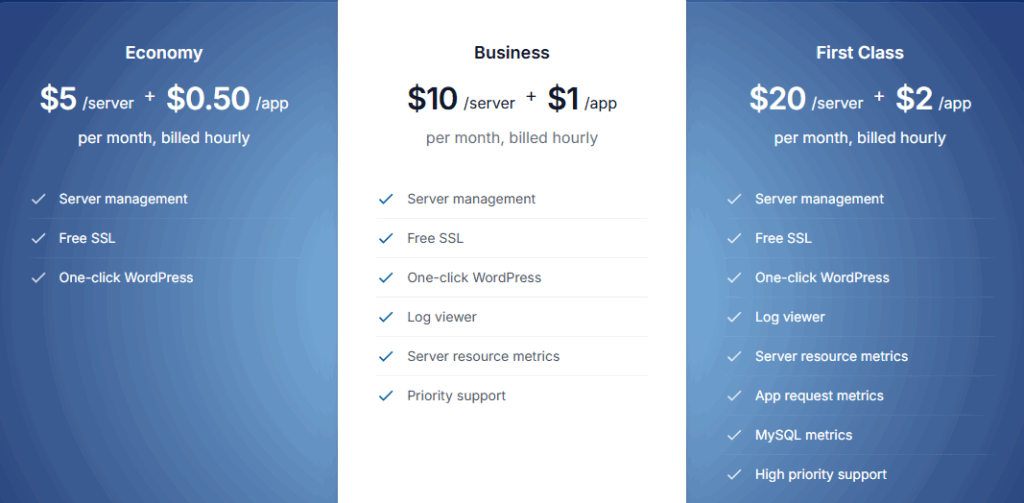
I know that ServerPilot is a good fit for those who want NGINX features. The metrics also help you better understand CPU and memory usage across your servers. You may not like ServerPilot if you prefer modern features and LiteSpeed.
Another issue is that using ServerPilot for multiple servers and websites can be costly, since each server or website incurs separate charges.
Highlights:
- Simple user interface
- Cost-effective for a few websites
- There’s a separate price for each app
- The entry-level plan lacks essential features
- It lacks LiteSpeed and modern features.
8. SPanel

SPanel is an enterprise-level server control panel and an ideal alternative to cPanel and Plesk. It is definitely not for people who want an easy-to-use panel like SpinupWP.
It’s from a popular hosting company called ScalaHosting. But it suits people who want powerful features and need to manage multiple servers and agencies. Cheaper than Plesk or cPanel and supports any VPS with APIs.
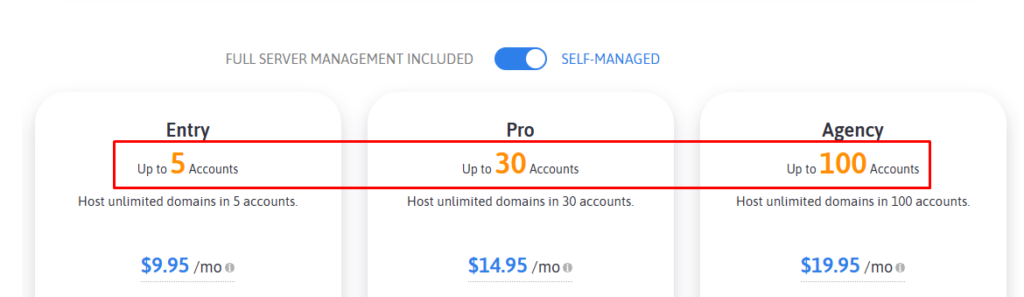
It presents two pricing options: fully managed and self-managed. Self-managed is a cheap option for users who like to handle things themselves.
The first plan starts at $10 and allows up to 5 accounts. The fully managed service includes expert support for server and account problems.
SPanel’s live chat lets you connect with a technician instantly. It starts at $20 for up to 5 accounts, and yes, it’s cheaper since the price is based on accounts, not servers.
Key Features:
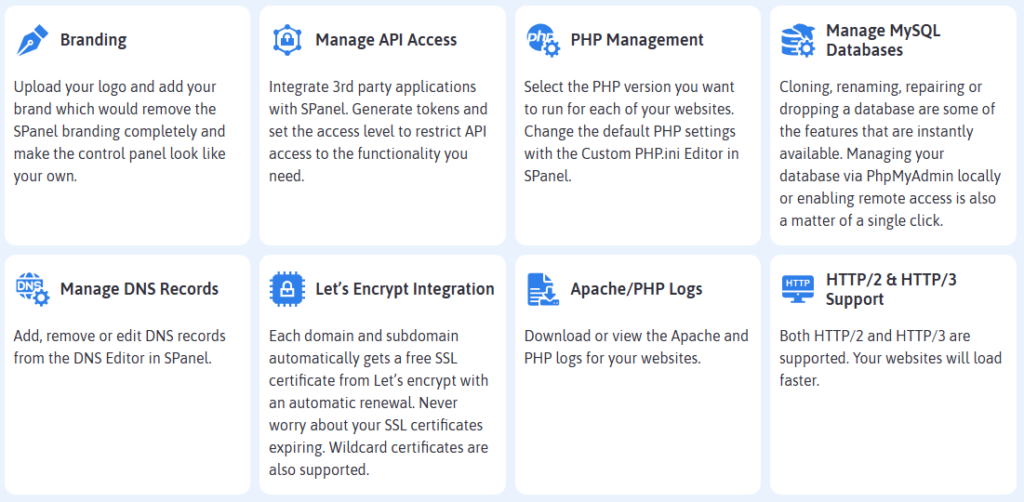
SPanel allows for white-labeling, so you can upload your logo, customize the control panel with your brand, and remove SPanel branding.
SPanel isn’t suggested for small VPSs or average websites, as it can feel overwhelming, but it is an economical, robust option for multiple servers.
Highlights:
- Not for small VPSs
- Softaculous auto-installer
- Email boxes for all your domains
- It is not intuitive for a beginner to use
- Many developer-friendly features with root access
- Use free OpenLiteSpeed or your enterprise version.
To Wrap It Up
WordPress cloud hosting control panels like FlyWP, SpinupWP, and xCloud are suitable options for anyone looking to host their websites securely.
ClusterCS, RunCloud, and Ploi.io are advanced panels for more than WordPress. Traditional panels such as cPanel, Plesk, and Webuzo can host WordPress but are mainly suited for enterprise use and lack modern features.
Server management platforms usually target users who want cheap, high-performance hosting with the benefits of VPS or dedicated servers. VPS offers decent TTFB and suits high-traffic, dynamic websites.
Compared to shared hosting, VPS/dedicated hosting is faster because it provides enough server resources with customization. If you manage multiple clients/servers, use a reliable WordPress hosting control panel; it can benefit even a small site.
Read More: Copy Text From Protected Websites