
Vultr provides high-quality cloud services to developers and small and medium-sized businesses at an affordable price. It is a reliable cloud computing company with 33+ data centers globally, offering services ranging from simple VPS to GPU bare metal.
I have used several providers over the years, and Vultr offers decent performance, particularly on high-frequency servers powered by EPYC or Xeon CPUs.
Vultr, DigitalOcean, UpCloud, Kamatera, and Krystal Cloud are all decent virtual server providers and competitively priced. These companies stand out by offering low starting prices and fast, reliable infrastructure, and they score pretty well on benchmarks.
I like trying virtual servers from various providers; it’s a budget-friendly way to host a website, and you can make changes whenever you need to.
Hourly billing lets you test services short-term without a monthly commitment. Choose a provider that doesn’t offer shared hosting. I usually go with smaller or medium-sized providers. Now, let’s review Vultr cloud hosting.
Products and Pricing
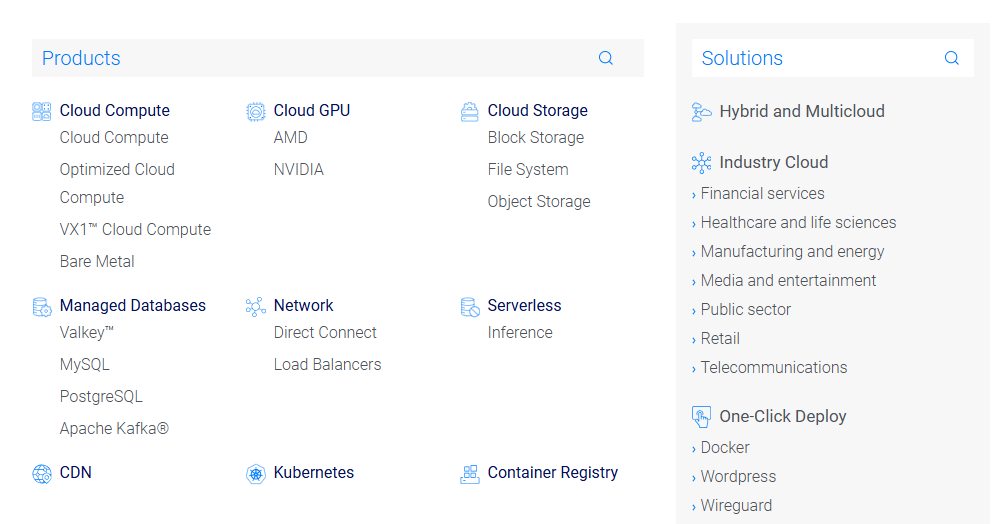
In addition to droplets, Vultr has multiple services, including storage, load balancers, GPUs, and VPN. They offer lower prices than AWS and Google Cloud and compete with DO, UpCloud, and Akamai. OK, let’s look at the cloud service types and their prices.
Regular Performance
Regular performance servers suit static websites with moderate resource needs. These servers run on older-generation Intel CPUs and SSDs; although they are a bit cheaper than high-frequency servers, I would still choose HF or AMD EPYC for active websites. Still, they offer flexibility, and you can integrate them with your favorite control panel.
Vultr accepts multiple payment methods, including cards, bank transfers, PayPal, and even crypto through BitPay. Price list:
| CPU | RAM | Bandwidth | Storage | Monthly fee |
|---|---|---|---|---|
| 1 | 1 GB | 1 TB | 25 GB | $5 |
| 1 | 2 GB | 2 TB | 55 GB | $10 |
| 2 | 2 GB | 3 TB | 65 GB | $15 |
| 2 | 4 GB | 3 TB | 80 GB | $20 |
| 4 | 8 GB | 4 TB | 160 GB | $40 |
SSD hosting is viable, but I recommend it only for average websites, as my speed test results were lower than expected. They have servers with 24 CPUs and 96 GB of RAM.
I don’t see the point in using SSD hosting, since high-frequency is slightly pricier. Yet, the performance is decent. For unmanaged cloud VPS, I prefer smaller companies.
High-Performance Servers
As I mentioned, they offer two high-performance server options: AMD EPYC and Intel Xeon, both priced the same. You can pick up to 48 GB of RAM.
| CPU | RAM | Bandwidth | Storage | Monthly fee |
|---|---|---|---|---|
| 1 | 1 GB | 1 TB | 32 GB | $6 |
| 1 | 2 GB | 2 TB | 64 GB | $12 |
| 2 | 2 GB | 3 TB | 80 GB | $18 |
| 2 | 4 GB | 3 TB | 128 GB | $24 |
| 3 | 8 GB | 4 TB | 256 GB | $48 |
High-frequency works well for dynamic websites or sites with many visitors because it offers strong performance. These servers use NVMe drives instead of regular SSDs.
Optimized Cloud Compute
Optimized Cloud run on AMD EPYC CPUs offers reliable performance for different apps, and you can choose from four types of services:
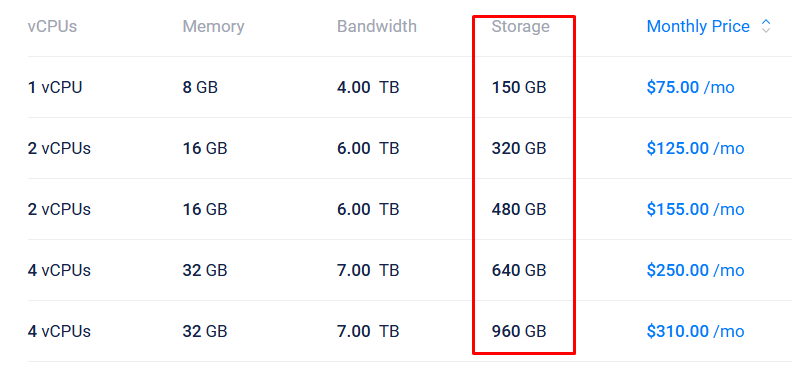
1. Storage Optimized: Typical CPU/RAM combo and high NVMe storage. Works well for sites with many databases and related systems. With 1 CPU, 8 GB of RAM, and 150 GB of NVMe storage, it costs $75.00/month; you can increase NVMe capacity to 5 TB.
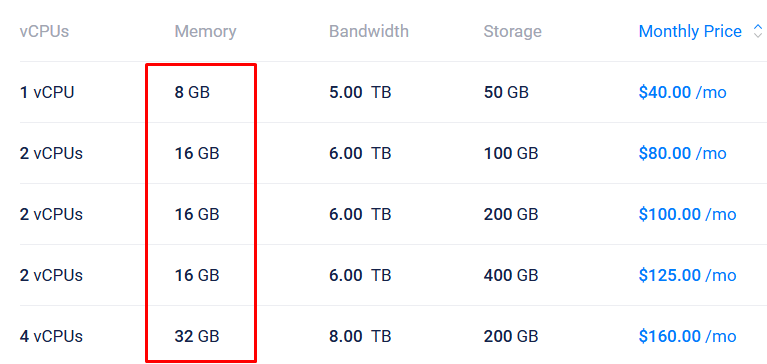
2. Memory-Optimized: These VMs provide significantly more RAM than CPUs and NVMe. Pricing begins at $40.00/month with 8 GB RAM.
3. CPU Optimized: More CPU power and Ideal for video processing, data syncing, high-traffic sites, and mining. You can get 4 cores for under $100.
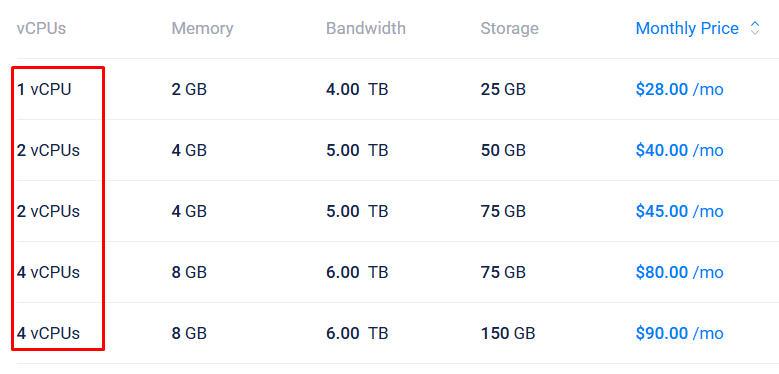
4. General Purpose: Ideal balance between CPU, RAM, and NVMe. Use it for online stores, gaming, streaming, API servers, and high-traffic web apps. It costs $30 per month and includes 1 CPU, 4 GB RAM, and 30 GB NVMe storage.
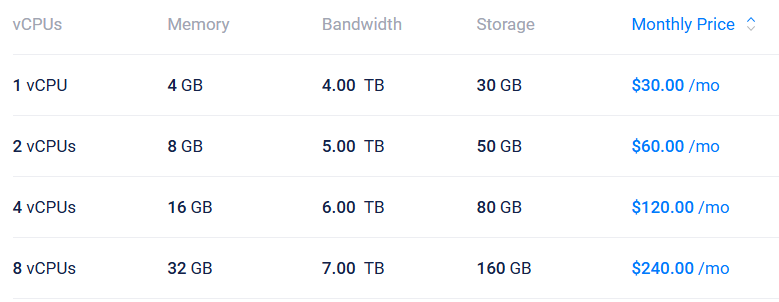
Optimized cloud servers are often used for specific purposes (they are expensive but effective for normal websites and ideal for large-scale projects).
Vultr Bare Metal
See, bare metal offers direct access to physical hardware without a virtualization layer, and Vultr provides two types of bare-metal servers: GPU and CPU.
- Cloud GPU: Typically used for AI, graphics rendering, video encoding, and other data-intensive processes. Have high-performance models such as the AMD MI355X. You can also opt for low-end GPUs, such as the NVIDIA A100 and A16.
- CPU bare-metal: Provides high performance by dedicating all server resources to a single client. You are responsible for setup and management.
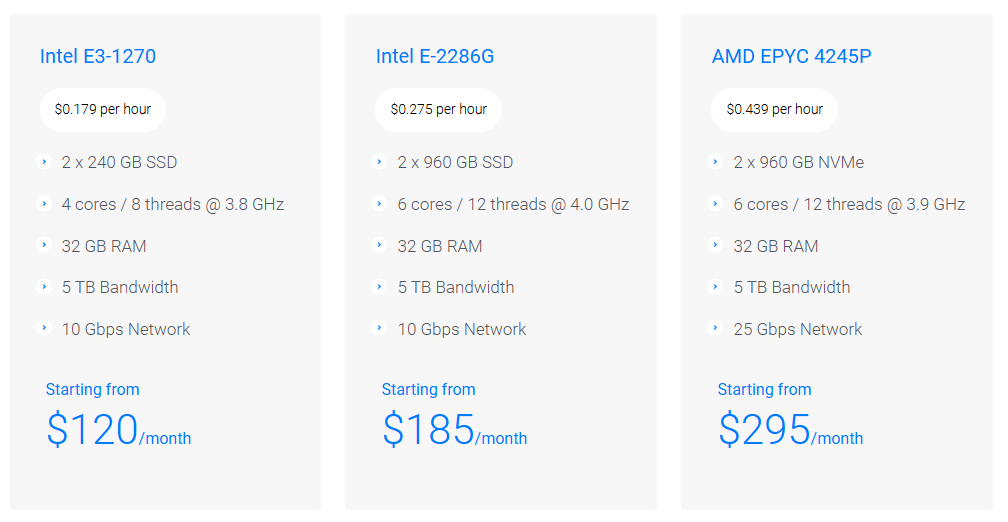
Bare-metal CPU servers are ideal for e-commerce, ad exchanges, hosting, and other large-scale businesses. They are ideal for high-traffic websites and are commonly used by resellers and shared hosting providers. Plans start at $120/m and include 4 cores, 32 GB RAM, and 5 TB bandwidth. GPUs aren’t used for websites; they’re so expensive that even an average GPU server can cost over 10,000 USD a month. Vultr bills GPU pricing hourly, on demand. You can use GPUs without reservations or special requests.
Other Products
- Block storage: 10 GB for $ 1/month.
- Object Storage: Store videos, songs, and files online. Monthly bandwidth and storage up to 1 TB.
- Databases: Databases for Valkey, MySQL, and PostgreSQL, and in-memory NoSQL databases for large-scale, dynamic data. It also supports multiple use cases, including serving as a database and a streaming service.
- Load Balancer: Helps minimize errors and downtime by distributing server workload, and it’s $10.00 per month.
- CDN: Usually better not to use the CDN included with your hosting provider. There are many reliable CDN providers to choose from.
Vultr High Frequency
Well, here’s the most preferred cloud VPS among bloggers and developers: “Vultr High Frequency“. Multiple tests prove that high-frequency servers outperform standard hosting, as reflected in strong Geekbench scores. These servers use Intel Xeon CPUs running at over 3 GHz and NVMe, though they still operate in a shared environment.

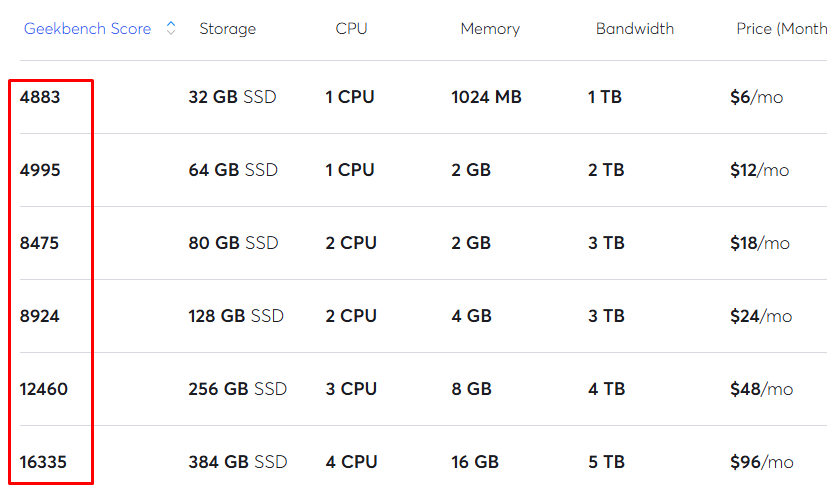
They use top-notch EPYC-powered servers that deliver performance on par with high-frequency servers. Plus, modern hardware and stacks make it easier to optimize TTFB and overall performance. So you can use a modern host like FlyingHost.
Shared hosting typically offers limited control, as you must use the host’s stack. It’s tough to make changes because they use both Apache and Nginx as reverse proxies.
The server runs entirely on Apache on older-gen hardware. But typical static websites, such as blogs and content sites, usually don’t encounter many issues with this setup.
HF servers are ideal for all kinds of websites, even for those that can’t be cached. They offer NVMe storage and high-clock-speed CPUs, which sustain websites with complex themes and advanced features. Cloudways, xCloud, and ServerAvatar offer Vultr high-frequency hosting options at a premium price because they’re already optimized, making them an ideal choice for anyone who isn’t familiar with server management.
Data Centers
Vultr has more than 30 data centers worldwide, making it easy to set up low-latency servers from almost anywhere. The control panel also lets you choose your preferred server location during setup.
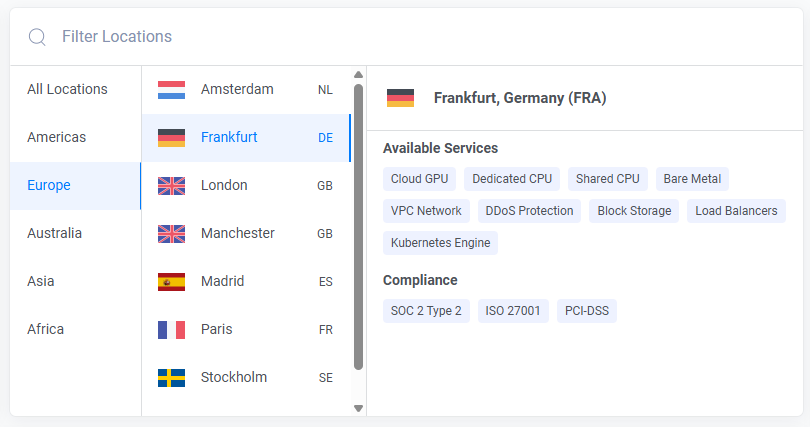
Data center regions:
- North America: Chicago, Dallas, Seattle, Los Angeles, Atlanta, Silicon Valley, Toronto, Miami, Mexico City, Honolulu, and New Jersey.
- South America: São Paulo and Santiago.
- Europe: London, Frankfurt, Milan, Paris, Manchester, Warsaw, Madrid, Stockholm, and Amsterdam.
- Asia: Osaka, Tel Aviv, Tokyo, Seoul, Singapore, Mumbai, Bangalore, and Delhi.
- Australia: Melbourne and Sydney.
- Africa: Johannesburg
Your site’s DNS connection time should be under 100 ms. So choose a server location as close to your audience as possible.
For websites with visitors from Asia, use a data center in the region, such as Singapore. Websites targeting the USA, Canada, or South America should use a U.S. data center. For users in Australia, New Zealand, or South Asia, you can choose Melbourne.
If all your visitors are from Africa, Johannesburg is the most suitable choice. Still, I suggest keeping the website based in a stable city, such as Madrid. Latin American users can choose between Mexico City, São Paulo, and Santiago.
Where is the best place to host websites with worldwide traffic?
I’ve tried different places like Europe, the US, Singapore, and India. Honestly, no single option works in every circumstance. Look at where your website’s traffic comes from and pick a data center closer to your main audience. If most website visitors are from the US and EU, I would choose a server in New Jersey or Frankfurt for balance.
Yes: Web hosts with edge caching make your website load faster for people worldwide. You can use a CDN like FlyingCDN to ensure a consistent experience for everyone.
But this approach doesn’t always work, especially for websites with a lot of dynamic content. Go for a nearby data center for many reasons, and if you’re running a medium or large website, you’ll definitely want to use a CDN.
Control Panel and Marketplace
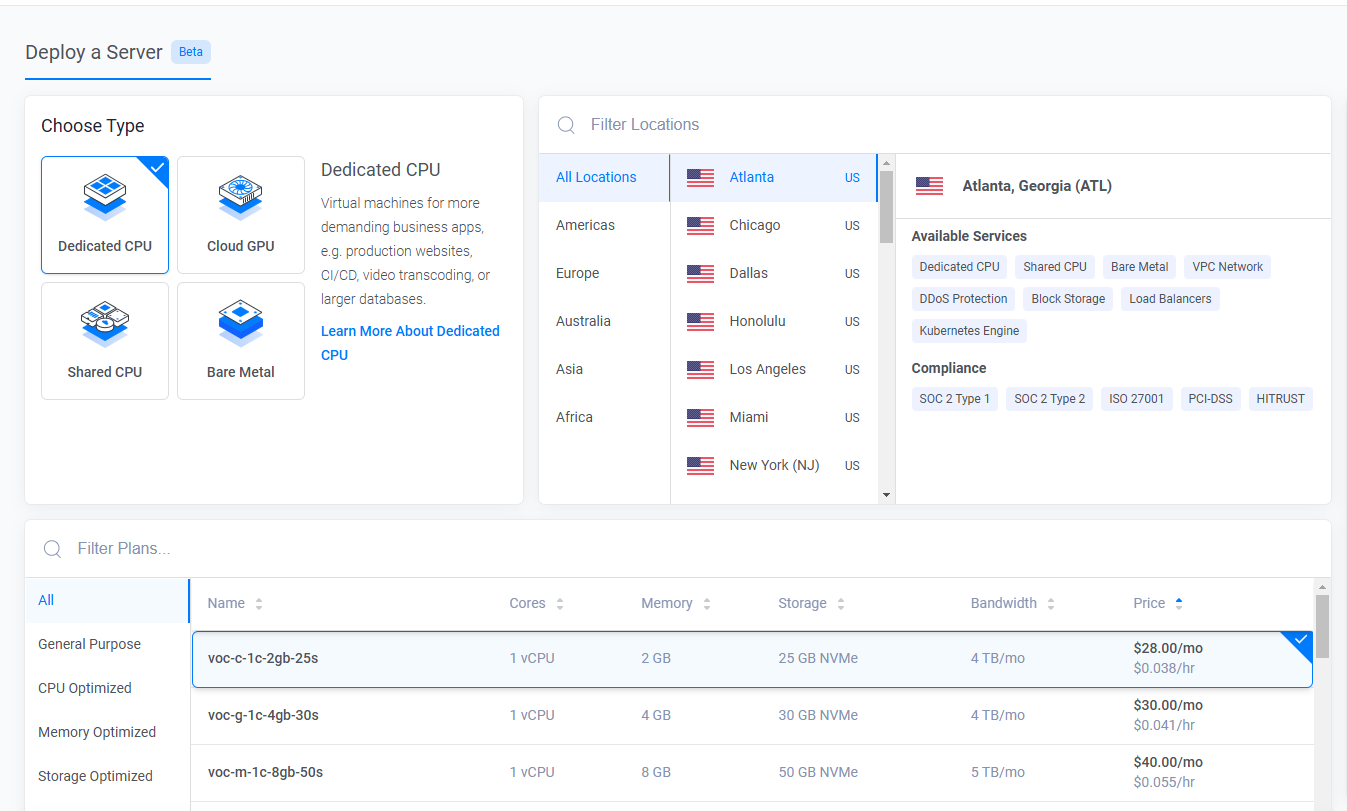
They don’t offer fully managed services like a regular web host. Setup is straightforward and requires only a few clicks. Once complete, you can manage your server easily from the dashboard.
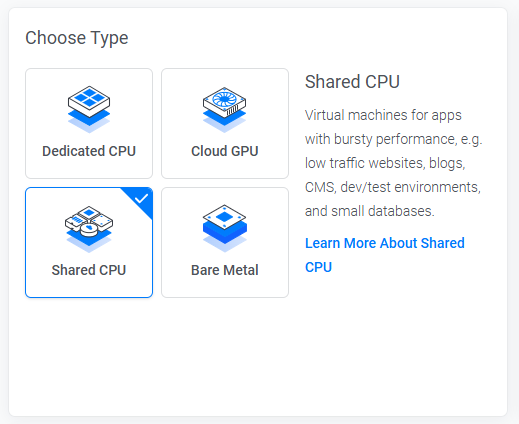
They do not provide fully managed services like a standard web host. However, you can start, stop, reboot, and reinstall servers as required. You can monitor your server’s resource usage in the server console and manage the IPs assigned to your server.
The panel allows users to manage features such as firewalls, networks, and DNS. The team management feature lets you set up limited access for others, and the server health tool alerts you when your app is under high demand.
VULTR panel has all the tools you need to handle a server. But if you are a typical user, I recommend using it with cloud hosting control panels like RunCloud, xCloud, or Ploi.
You don’t need technical skills to use hosting panels. You can use them fast, and most features are just a click away. There is one catch: using the control panel comes with a cost. Some providers charge up to $15/m. GridPane, for instance, can cost over $100.
CloudPanel is free, but you need some technical know-how to use it. xCloud costs less than $10/month for a standard user. You can also try Ploi or FlyWP for free.
Or try the Vultr control panel; it’s not bad. Once you know what to change, you can try different settings, which is closer to how the standard UI works.
Marketplace:
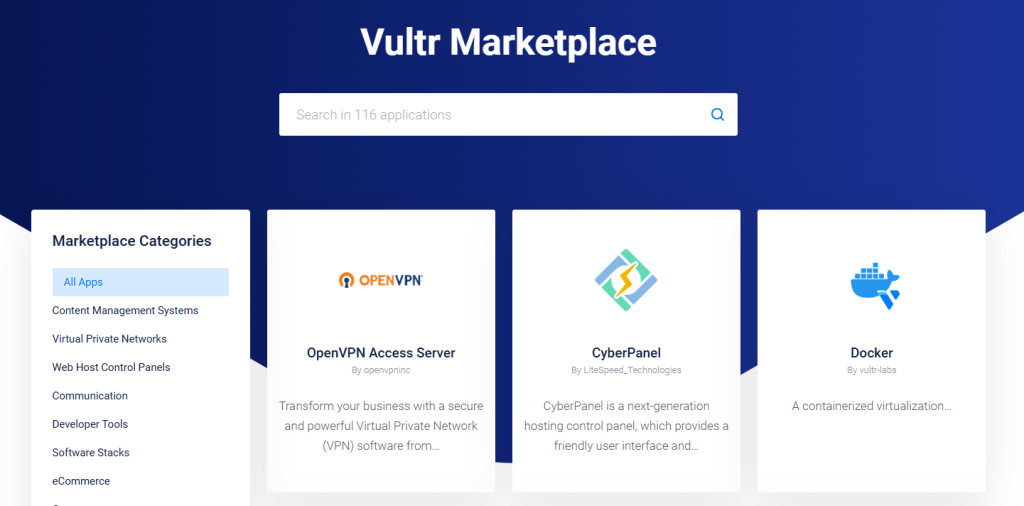
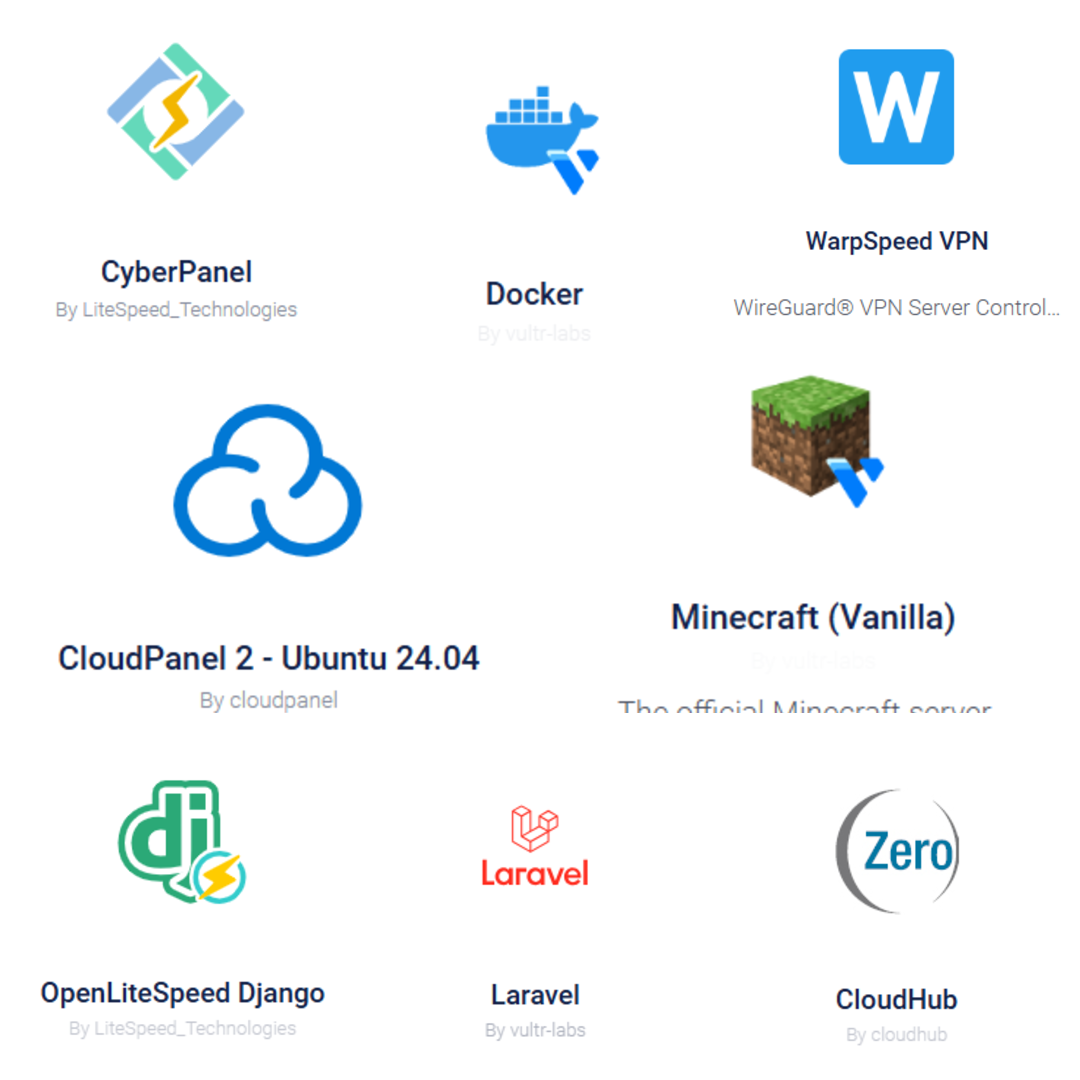
Vultr provides access to a large marketplace where you can deploy apps with a single click. You can install open-source and paid apps, and install OS such as Debian, Ubuntu, Rocky Linux, and Windows, or upload a custom ISO.

If you want to use LiteSpeed hosting, you can set up OpenLiteSpeed with WordPress on Ubuntu. It also works with Drupal, Joomla, and Rails. LiteSpeed is a fine choice because it includes a free cache plugin.

You can use free control panels such as CloudPanel and FASTPANEL, as well as paid control panels like cPanel, Plesk, and SWPanel. The marketplace features notable apps such as Docker, Bitnami stacks, and Colyseus.
You don’t need a third-party panel if you are familiar with these tools. They have some clear documentation on how to do these things. For average and new users, you may want to use a control panel (connect to the server via IP address or SSH).
Vultr Drawbacks
I’ve been using Vultr for years, and nothing’s ever gone wrong. However, there are certain drawbacks…
- There are numerous complaints about their customer service; however, it’s unmanaged. Many say their technical issues remain unresolved even after trying several times to get help. Most unmanaged cloud computing services don’t provide complete customer support, but they do offer adequate documentation.
- Similar to DigitalOcean in price, but pricier than Hetzner.
- Some customers complain about downtime.
- Advanced packages aren’t available at all server locations.
- I am not happy with the web console (built-in SSH terminal) because it is difficult to use and almost unusable. In that case, you will likely need an external SSH client such as OpenSSH or PuTTY.
Final thoughts
With Vultr, you can deploy virtually anything, from a small website to a large one, even AI. They have high-frequency servers built with the latest tech. Users appreciate its affordable prices, steady performance, and the choice of several data center locations.
I haven’t used their Cloud GPU or Bare Metal, so I can’t really say how they perform. You can use VULTR easily if you’re comfortable with those things.
They also have an app marketplace where you can upload your ISO and run it across 33 data centers globally. That’s why many devs and website owners choose Vultr Cloud.
Everything has its pros and cons; Vultr’s panel is friendly, but the built-in SSH terminal is relatively annoying. They could improve a few other areas.
Many cloud providers, such as DigitalOcean, UpCloud, Kamatera, and Linode, offer similar services. Larger providers like AWS are reliable but often more expensive.