
FlyingCDN is an exclusive CDN for FlyingPress users powered by Cloudflare Enterprise. It offers several benefits over a typical CDN, including Cloudflare, which caches content across more than 330 POPs, so visitors can access it without delay.
Most importantly, it includes smart routing, page optimization, and full-page caching to help your website load faster, even during high traffic. Before switching to Cloudflare, FC used BunnyCDN. Overall, most users will find this important because you get more features and POPs than with Bunny.
These guys just rolled out a managed WordPress hosting service called “FlyingHost.” The cool part? If you use it, you won’t need to worry about FlyingPress or this CDN.
To be clear, I will not explain what a CDN is or how it works at the end of this article. Instead, I will give you a brief review of FlyingCDN. Here’s how to optimize your visitors’ browsing experience with FlyingPress optimization and its CDN.
FlyingCDN Features
Nearly all CDNs claim to be fast and tout their quality. But I don’t totally agree that FlyingCDN is the best choice. What sets it apart is its smooth integration with Cloudflare Enterprise. The process is automatic, and you do not need to register for Cloudflare.
If you want to get CF Enterprise on your own, it costs about $6,000 per month. I have experience with Cloudflare Enterprise (I have used it for this site).

Compared with other plans, it provides access to all global edge locations and offers advanced features and security, resulting in better performance and protection.
And I have several reasons to set FlyingCDN apart, and they are:
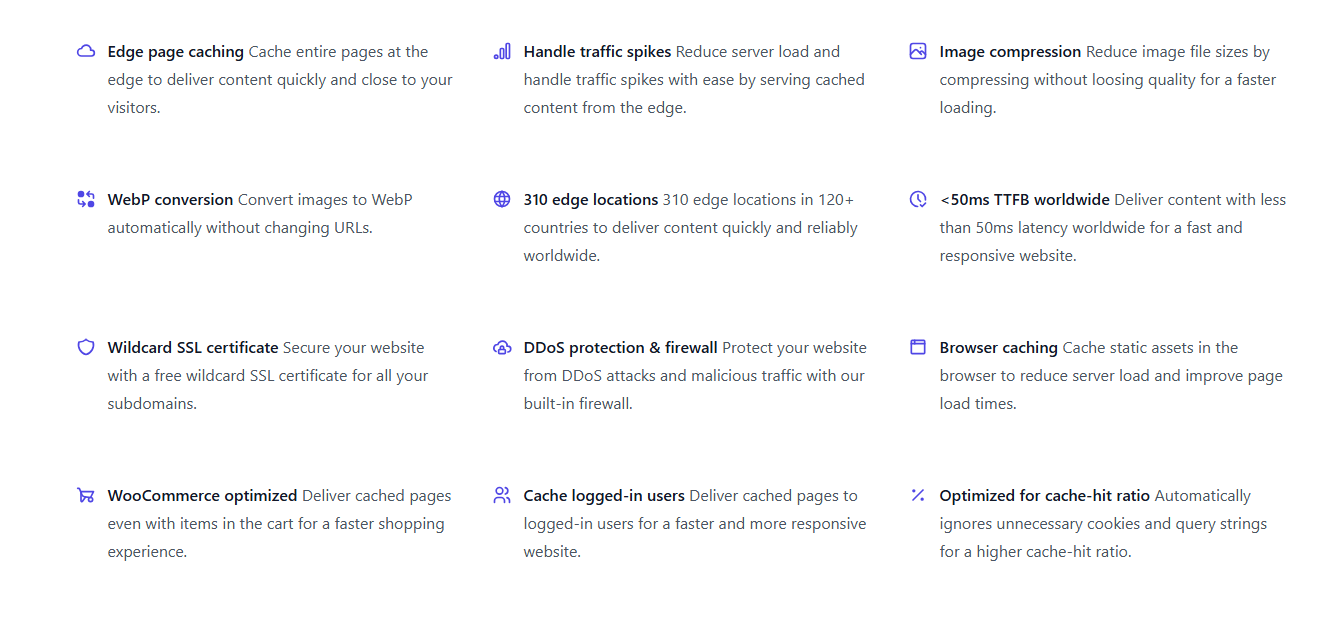
- Widespread CDN: With 310 edge locations across 120+ countries, Cloudflare excels even behind proxies, even though it’s not a traditional CDN.
- Full-Page Caching: For me, one of the most essential features. Most CDNs do not support HTML caching, but with FlyingCDN, TTFB is under 100 ms.
- Image enhancement: Included in the setup and automatically converts images to WebP without changing URLs. Adaptive images (the right size) and compression without affecting quality.
- Latest Security: Cloudflare specializes in security, so Enterprise provides strong protection (No security plugins or services are needed).
- WooCommerce-ready: Page caching speeds up browsing, including shopping cart pages; however, the origin server still handles critical dynamic requests.
- Adapt to traffic spikes: reduces unnecessary queries, speeds up pages, lightens server load, and handles spikes more effectively.
It works with any web host so that you can count on its flexibility. But choosing a good web host is key when you’re using a CDN, as it improves caching and UX.
FlyingPress And FlyingCDN
Having used FlyingPress for years, I’d say it’s the ideal cache plugin for improving your WordPress site speed (it’s easy to use and offers several features). I’ve already written a FlyingPress review, so I won’t go into specifics here.
With one of the largest edge networks, Cloudflare is regularly rated among the fastest CDNs, and it can reduce latency, security errors, and other issues.
It’s a powerful WordPress CDN with strong security features, including firewalls, DDoS protection, Wildcard SSL, and bot management. It also includes features like Argo, dynamic caching, load balancing, and image optimization to help things run smoothly.
Edge Caching, AKA full-page caching, is a caching technique that stores HTML pages on EDGE servers near end users rather than on the origin server.
Full-page caching reduces the time to first byte for users. TTFB depends on factors such as your web host; choose a reliable host like Vultr.
Cloudflare caches your site’s HTML, so you’ll notice a big improvement when you test your site with tools like SpeedVitals. You’ll benefit from Argo if you have a shop or dynamic sites. They have a massive CDN network with cloud caching and optimization.
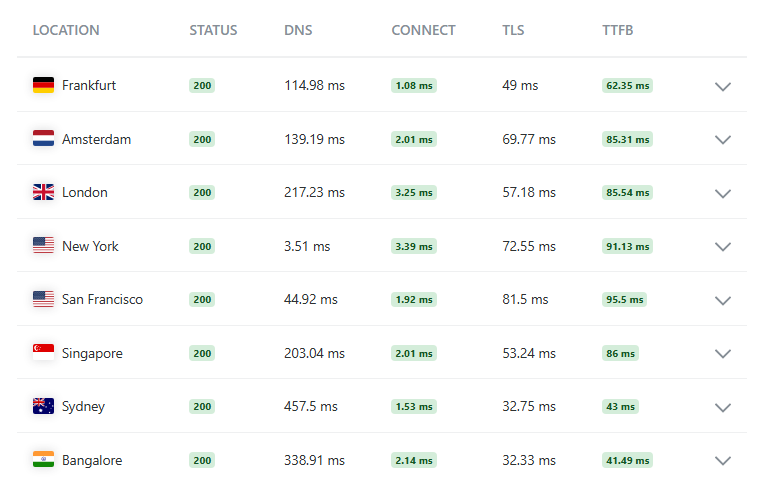
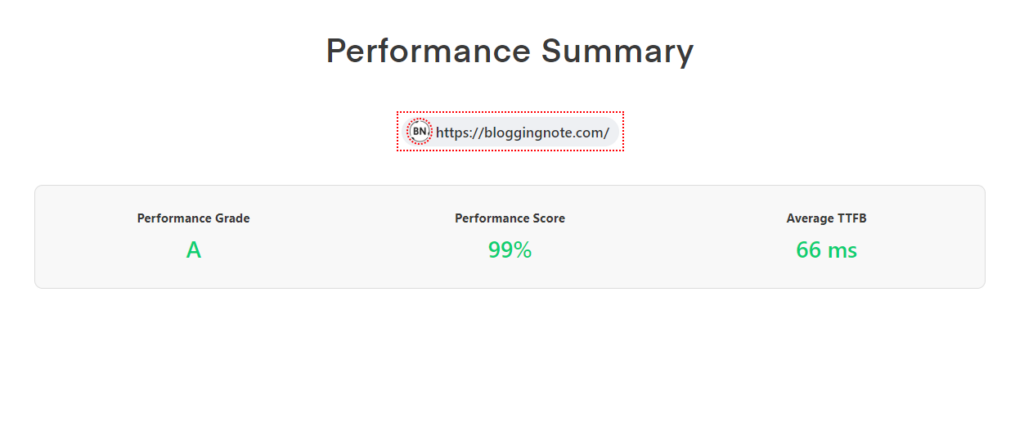
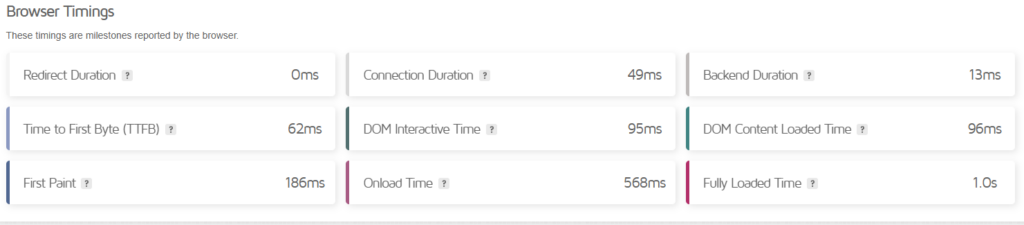
When you use full-page caching, your site’s global time to first byte will likely be below 100 ms. TTFB measures how long it takes the browser to receive the first byte of data from the server. When it is low, users have a better experience, and pages load instantly.
As I said, the only page speed metric I care about is TTFB; a high TTFB means being stuck on an empty screen while you wait for the server to respond.
Core Web Vitals signals are significantly affected by high TTFB. You can simplify this by using a CDN and moving to a VPS with a cloud control panel.
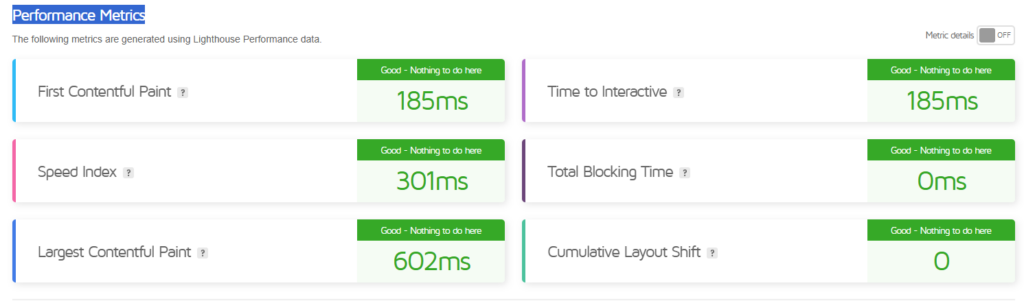
This technique can deliver dynamic content, and you can benefit even if your site has heavy themes and page builders. See GTmetrix results after using FlyingPress+CDN:
FlyingCDN Integration
The first step is to become a FlyingPress customer. I mean, you can use it only with the FlyingPress cache plugin. I don’t see any other way to use it, as it requires an API key.
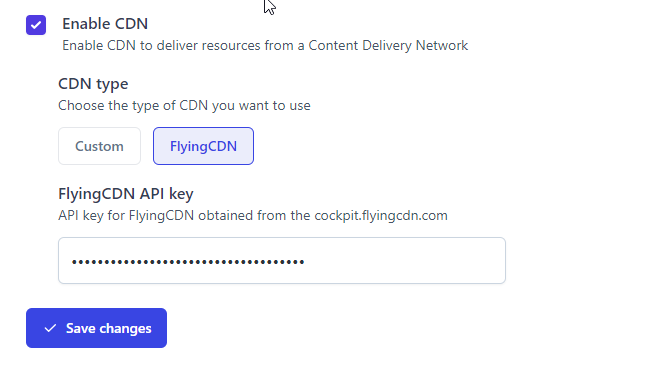
I assume you’re using FlyingPress. You can try the free 7-day CDN trial. Sign up, then go to your CDN dashboard and add your website (don’t use ‘www’). Enter your server (web host) IP address.
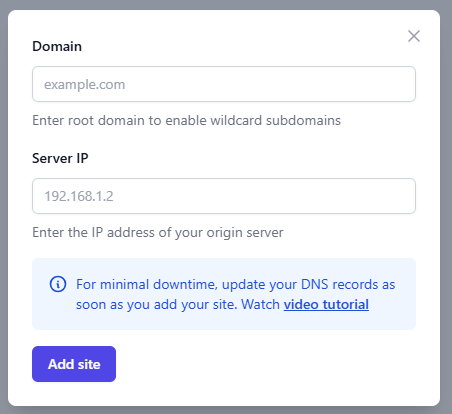
During the process, you will receive an IP address and CNAME record, which you should use to update your website’s DNS records.
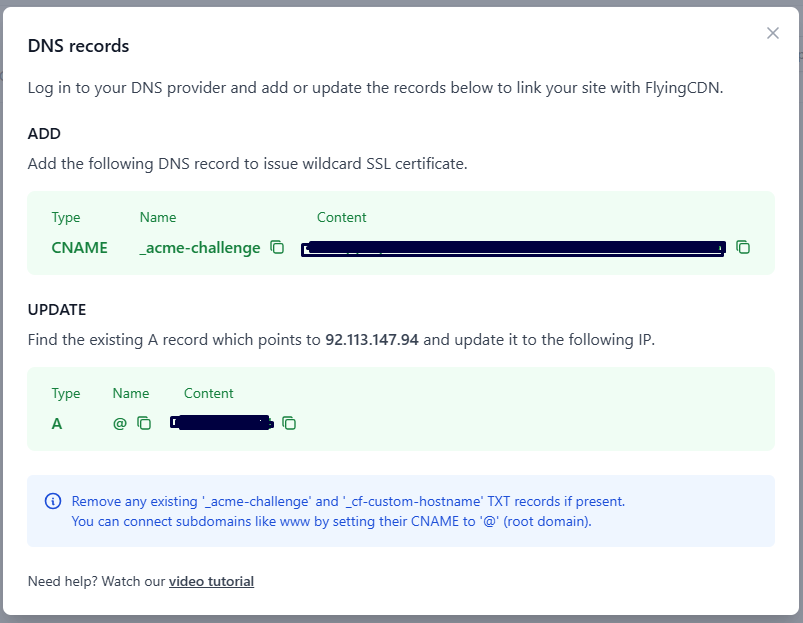
Log in to your DNS provider and add or update records. Then, don’t activate the proxy if you are using Cloudflare DNS.
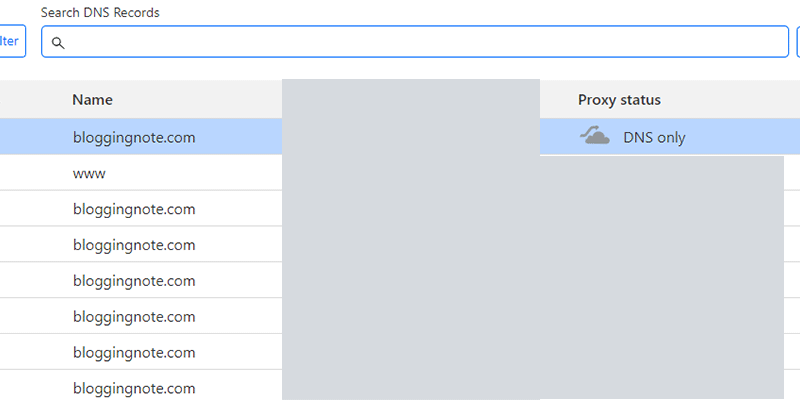
It’s easy; read the doc if you have a question. Or learn how to integrate.
Verify It Works
With the KeyCDN HTTP Header Checker, you can ensure the CDN works on your site. Check the site URL, and you’ll see the first request headers:
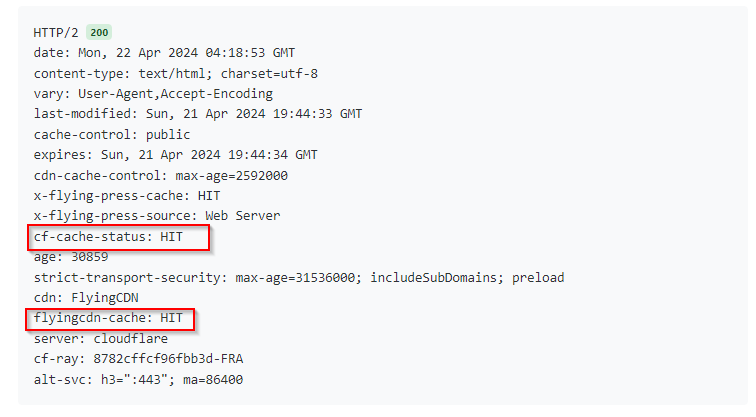
x-flying-press-cache: HIT
cf-cache-status: HIT
cdn: FlyingCDN
flyingcdn-cache: HIT
server: cloudflare
If all cache statuses are HIT, everything is fine. TTFB depends on your host and caching strategy, such as full-page caching. Web hosts like Rocket.net use this technique.
FlyingCDN vs. BunnyCDN vs. Cloudflare Pro
| FlyingCDN | BunnyCDN | Cloudflare Pro | |
|---|---|---|---|
| Price | Starts at $10/M | Minimum $1/M | $25/M |
| Full-page Cache | ✓ | × | APO |
| Smart Routing | ✓ | × | Argo |
| Optimizing Images | ✓ | Paid | Polish/Mirage |
| Points of Presence | 300+ | 120+ | 250+ |
| Access All Locations | ✓ | ✓ | × |
| Simple Configs | ✓ | × | × |
| Automatic Process | ✓ | × | × |
| Customizable | × | ✓ | ✓ |
| UI | Minimal | Extensive | Depth |
| Cache Hit Ratio | Very high | High | Average |
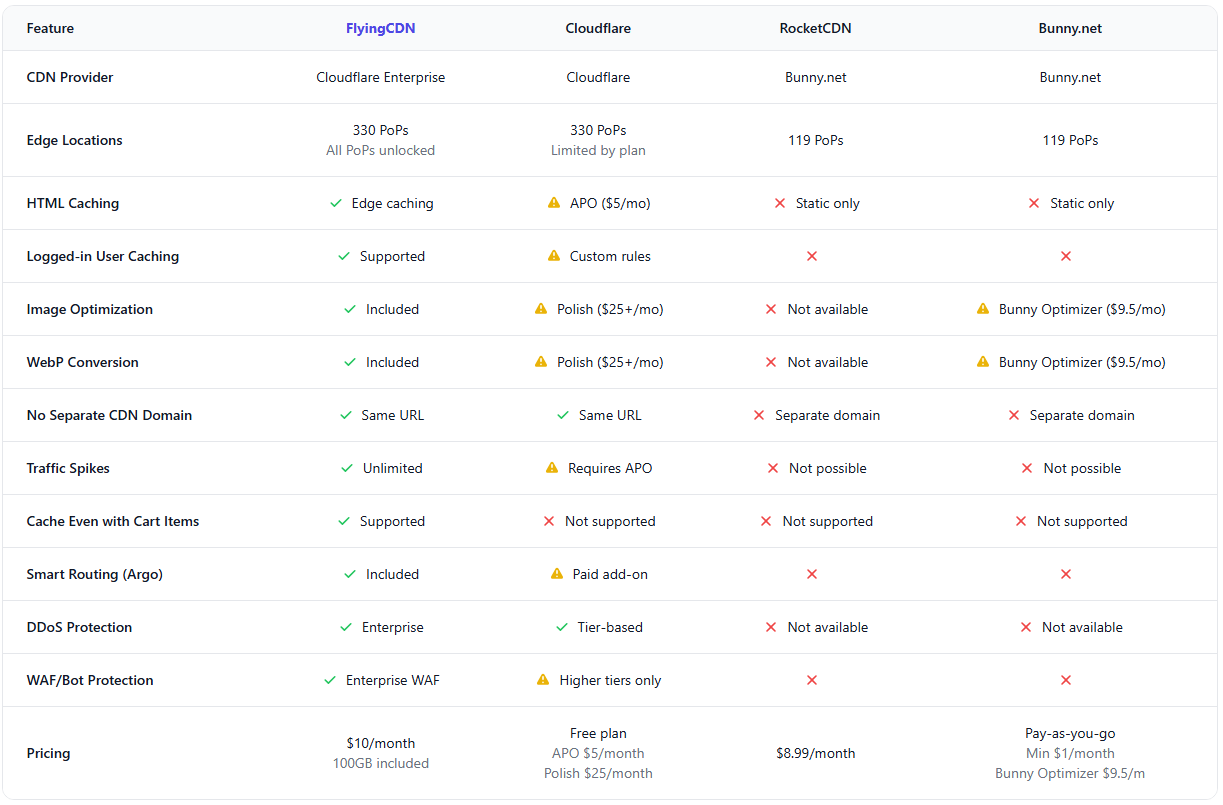
Price Comparison
Want to use Cloudflare Enterprise for just $10?
The monthly fee recently increased from $5 to $10. But if you buy Enterprise directly, you’ll pay thousands of dollars. Yes, it does not offer as many customization options as the Cloudflare dashboard (far from it). But FlyingPress CDN has no hidden costs and offers more affordable pricing than KeyCDN, Rocket, and even BunnyCDN.

It’s $5 per 100 GB of bandwidth per site. Web hosting companies usually provide tools to track your bandwidth usage. You can now view it in your current CDN usage. Plus, small to medium websites usually use less than 100 GB of bandwidth per month.
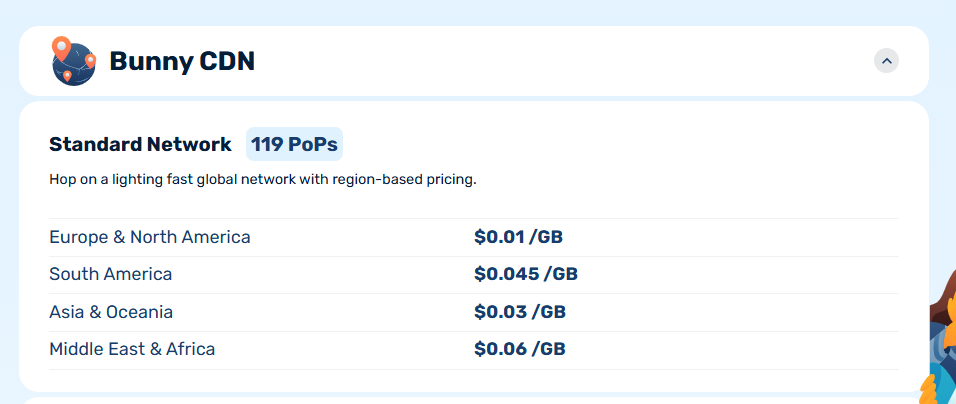
FlyingCDN is cheaper than KeyCDN, with 1 TB of bandwidth at about $50/m. But with KeyCDN, the minimum usage fee is $4, and you need to deposit at least $49.
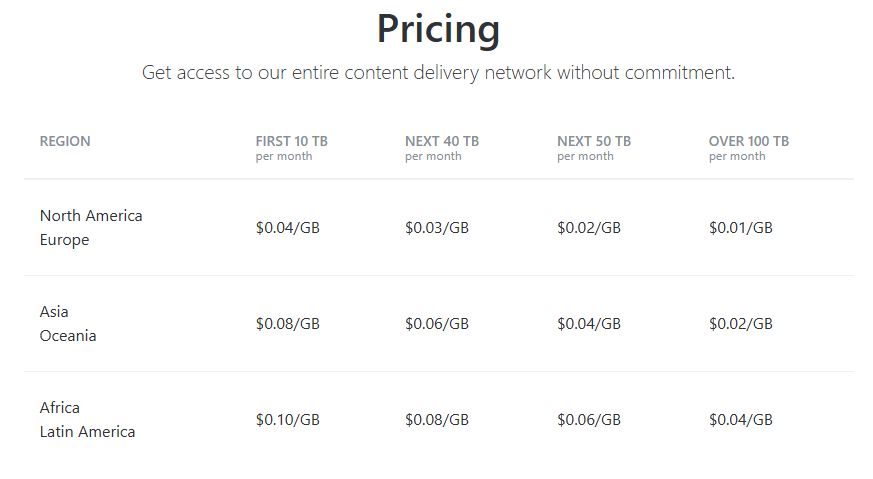
FlyingCDN costs $50/M for a site with 1 TB of bandwidth, making it affordable. It offers high-end features and is a solid alternative to Bunny or KeyCDN for WordPress sites.
I wouldn’t recommend this option if you prefer to proceed your way. Furthermore, I don’t think you can buy the Enterprise CDN service at this price.
Drawbacks
When setting up FlyingPress and its CDN, you’ll immediately feel how minimalist it is. There aren’t that many options. If you are familiar with other CDNs, you will find this straightforward. But here are a few little annoyances…
- Lacks detailed documentation.
- The significant limitation is that you need FlyingPress to use it.
- Users can’t set the hostname to cdn.example.com. Since Cloudflare functions as a proxy rather than a CDN, it won’t matter.
- You can’t customize anything, which may be acceptable for average users but problematic for advanced users.
- The UI doesn’t provide as many details as other CDNs. You see balance, bandwidth usage, and integration info. It would be beneficial to review metrics such as cache hit rates, visitor counts, IP addresses, WAF history, and platform data.
- Have difficulty determining which features are enabled or disabled.
Those are the only things I’ve been annoyed with about FlyingCDN. It is ideal for those who prefer a stress-free experience. If you’re using low-cost hosting for WordPress, it doesn’t matter how robust your CDN is.
Final thoughts
So, I am impressed with FlyingCDN. It’s a solid choice for those who seek an automated CDN without manual setup, but you must be a FlyingPress user to use it.
Just add the domain, point it to the DNS record, and you’ll love it. It’s cheaper than most other WordPress CDN providers, but the lack of customization makes it less suitable for tech enthusiasts who want to adjust it to their specific requirements. But it’s a hassle-free service that won’t add problems to your website, even with page optimizations.
It works regardless of website type (static or dynamic) or traffic volume. The choice is yours, so give it a shot and see if it works for you.