

Over the years, I have used so many different WordPress cache plugins on my websites that I’ve lost count. I have tested them with different settings and servers to find the best results. Website performance depends on your hosting provider and site structure. Plugins, themes, and a CDN can all impact performance and other website functions.
You can combine cache plugins with asset optimization plugins, such as Perfmatters. But avoid stacking several caching plugins at once, since this risky combo can crash your site or create confusing duplicate features.
Some providers offer server-side caching, and some control panels support FastCGI. But you may still need a separate cache plugin depending on your configuration.
This is because cache plugins provide more site-wide improvements than server-side optimization. Many plugins also offer EXTRA features for your use.
I use LiteSpeed Cache and FlyingPress in my setup. LSC is free and offers multiple features, while FlyingPress is a paid plugin with a clean, user-friendly interface that gives you exactly what you need (you can use other caching plugins).
LiteSpeed Cache, WP Rocket, and FlyingPress are the top WordPress cache plugins currently available; here is a brief comparison of their key differences.
| Feature | FlyingPress | LiteSpeed Cache | WP Rocket |
|---|---|---|---|
| Prices | $59/Y | Free | $58/Y |
| Server-Side Cache | × | ✓ | × |
| Object Cache | × | ✓ | × |
| CDN | FlyingCDN | QUIC.cloud | RocketCDN |
| Regenerates cache | ✓ | × | × |
| Preloading critical Pics | ✓ | × | × |
| iFrame Optimization | ✓ | × | × |
| Regular updates | ✓ | ✓ | × |
| Cache control | × | Extensive | × |
| Debloating | ✓ | × | × |
| Element lazy render | ✓ | × | × |
| Resource localization | ✓ | ✓ | × |
| Separate Cache | ✓ | × | ✓ |
| Varnish Add-on | × | ✓ | ✓ |
1. LiteSpeed Cache

My #1 pick is LiteSpeed Cache because it’s free; #2 because it’s a solid solution; and #3 because it offers more features than other plugins. The LiteSpeed server offers DDoS and brute-force protection. It can help you optimize certain sections of a large site.
Still, this plugin can be tricky for new users. Currently, LiteSpeed integrates with many hosting platforms; however, for optimal results, use a reputable hosting service.
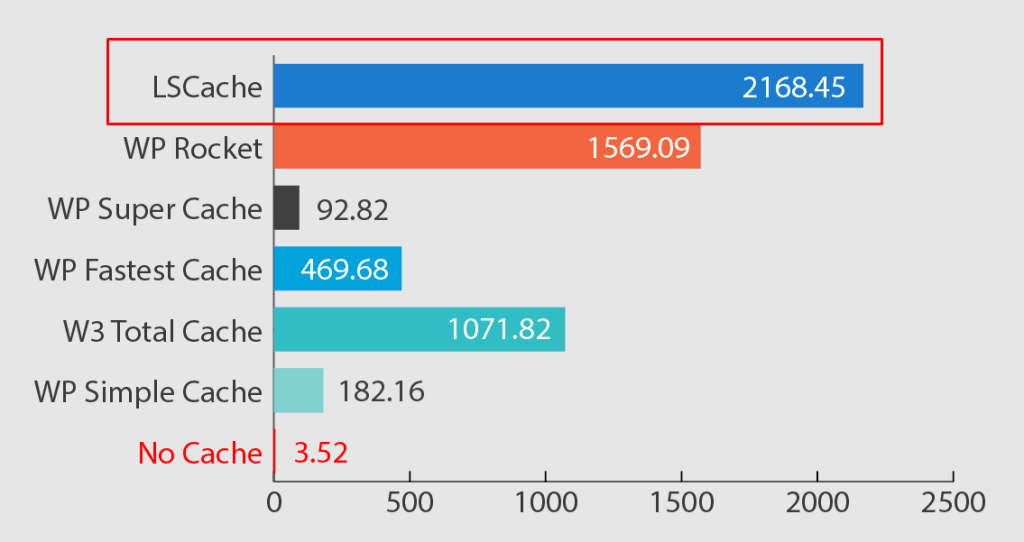
Unlike other caching plugins, LSC offers tons of asset optimizations, and you’ll need to be careful because many of them can mess up your site. LSC updates frequently and resolves bugs and issues promptly.
Reasons to Use LiteSpeed Cache:
- Almost all caching plugins work at the PHP level. However, LSC is a server-side cache plugin that doesn’t support cache preloading.
- It features numerous cache controls, including commenters, REST APIs, PHP resources, private cached URIs, and many more.
- It supports Redis and Memcached, plus settings such as persistent connections and web admin caching.
- It supports external resources for localization, like Gravatar and analytics.
- It effectively uses image and media optimization, including image preload, WebP, quality control, placeholders, lazy loading, and more.
QUIC.cloud is a CDN for LiteSpeed users. It’s the first CDN service that caches HTML at the CDN level. I don’t think QUIC.cloud is ideal; I prefer Cloudflare’s APO.
Other Considerations
LSC requires the LiteSpeed or OpenLiteSpeed server to enable caching and other features. It works with QUIC.cloud, but not so well.

The advanced user interface is LiteSpeed Cache’s main drawback. Its many features can be challenging to manage, requiring additional time and effort.
Its complex settings can easily break users’ sites if they don’t understand them, much like W3TC. Another downside is that it lacks cache rebuilding, which isn’t a major issue for large sites but may matter for low-traffic sites or those with dynamic content.
LiteSpeed Cache is a leading WordPress cache plugin used by over 7 million users. It has pros and cons, as well as alternatives, but it is compatible with LiteSpeed or QUIC. Still, it works well for dynamic, high-traffic sites and helps improve Core Web Vitals.
2. FlyingPress

A top-notch cache plugin from Gijo Varghese, FlyingPress is the most reliable cache plugin I’ve used, with advanced features without being complicated.
It’s an all-in-one WordPress optimization plugin, not just a caching plugin. It has even image optimizations and Core Web Vitals assessments. They started a WordPress hosting service called FlyingHost, and now FlyingPress is included for free. Even works with managed hosts like WP Engine, Rocket.net, and Flywheel, among others.
I’ve used several caching plugins, and most aren’t effective at removing unused CSS. But FlyingPress lets you pick how to load unused CSS after generating critical CSS.
The plugin does more than just address Core Web Vitals; it delivers blazing speed for real users (read my FlyingPress review). Even if you’re completely unfamiliar with WordPress, you’ll have no trouble using FlyingPress because it’s so easy to use.
With v. 5, the UI has been completely overhauled, with tweaks including improved Core Web Vitals tracking and Cloudflare full-page caching. FlyingPress works seamlessly with any supported server environment, including Nginx, Apache, and LiteSpeed.
FlyingPress Features:
It includes custom iframe settings, such as lazy loading and replacing YouTube videos with thumbnail images. Most cache plugins don’t include image optimization; you need separate plugins or CDNs. However, FlyingPress offers useful image features, such as excluding above-the-fold images, preloading critical images, responsive images with FlyingCDN, and auto-width and height, among others.
FlyingCDN is powered by Cloudflare Enterprise. You can get a rapid CDN with security features and a global TTFB under 100 ms. Every website needs fonts, but most people don’t optimize them. It blends and self-hosts Google fonts and displays fallback fonts.
Delaying JavaScript can slow down some websites, especially those with third-party scripts. FP optimizes JS by executing after user interaction. The lazy render elements function defers rendering until elements are required.

FlyingPress makes it easy for anyone to optimize their WordPress sites. I don’t think you need the optimization service for most of these points. It can’t optimize all areas, but it’s usually reliable. Just tick the elements, and it will do the rest.
3. WP Rocket

Over the years, WP Rocket has been one of the most popular paid cache plugins. I have used Rocket for a long time, but LiteSpeed Cache and FlyingPress have fixed my speed problems more quickly than WP Rocket. It has fine features and reliable support.
But WP Rocket has more cons than pros. My biggest complaint is that it’s outdated and hasn’t been updated in a while; according to the changelog, they only fix bugs.
Compared to FlyingPress, LSC, or even PerfMatters, WP Rocket does not perform well with “unused CSS.” It can seriously damage your website.
Rocket doesn’t support local fonts, so it’s not well suited for font optimization. I don’t recommend WP Rocket for optimizing iFrames and third-party resources.
But I prefer WP Rocket’s add-ons, especially Varnish and Cloudflare. Additionally, Rocket CDN settings allow you to use any WordPress CDN service you choose.

Although WP Rocket is still an ideal caching plugin and the tutorial is helpful, it’s no longer the top choice. Yes, it remains in the game and has a large user base.
But I think it’s now a deprecated plugin, and those who love WP Rocket should look at FlyingPress instead. Also, WPR raised prices across all packages.
4. Cloudflare APO

Want to cache full pages at CDN EDGE? You can use Cloudflare Automatic Platform Optimization. This Cloudflare plugin isn’t a conventional cache plugin.
It’s impractical without APO, and you still need a regular cache plugin. However, it lets Cloudflare serve your entire WordPress site from its edge locations.
Why should you consider Cloudflare APO?
Most CDNs don’t cache HTML in their networks. That is one of the primary reasons the website’s Time to First Byte is slower, even with a CDN.
APO lets Cloudflare serve entire HTML pages, not just static pages. The approach is also known as full-page caching (complete caching at the CDN level).
TTFB is the time it takes for users to receive the first byte of data from the server after a request. A low TTFB is essential for a fast website and significantly affects Core Web Vitals and other page speed metrics.
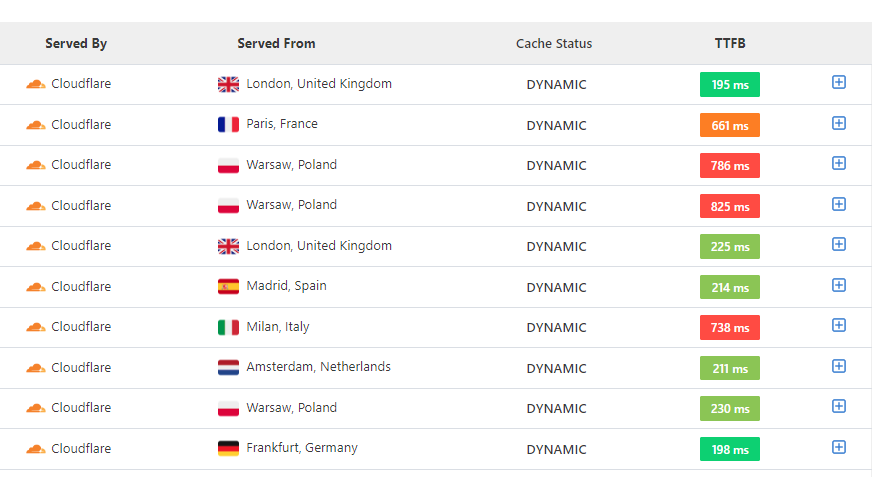
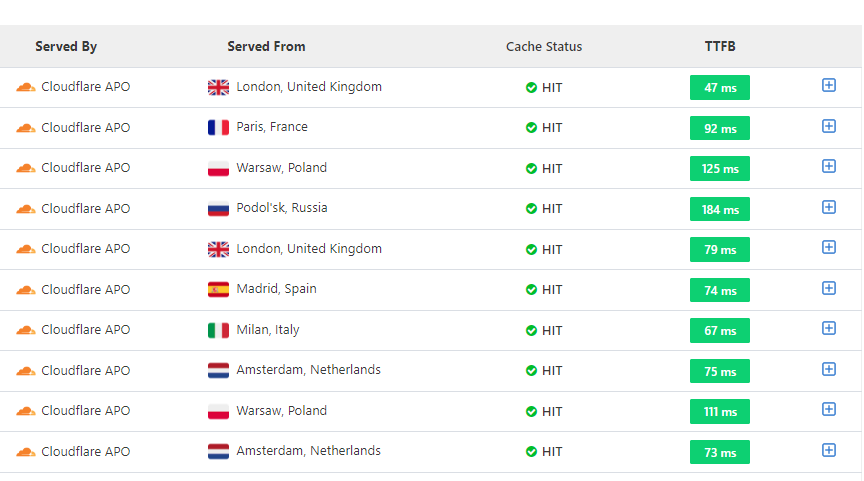
With a long TTFB, users often have to wait for the server to respond. So, Cloudflare Automatic Platform Optimization can reduce your website’s time to the first byte.
Optimize your site’s Time to First Byte before using other optimization tactics. See this screenshot showing TTFB with and without Cloudflare APO. TTFB test on Speedvitals (you can also use the KeyCDN performance test).
APO is an easy way to speed up your site; it is cheaper, offers decent performance, and includes extra features, but is compatible only with WordPress and costs $5/month.
APO is free with PRO and other PAID plans. You can still use APO with any type of cache plugin. However, you don’t need APO when using BigScoots, FlyingCDN, FlyingHost, or Rocket.net. They use Cloudflare Enterprise with full-page caching and other features.
5. Breeze

Breeze is a free caching plugin from Cloudways and works well with it and other NGINX and Varnish setups. But the optimization features aren’t impressive, and I’d like to see better progress in Breeze. I’ve noticed some improvements with the Cloudways cache plugin over the past months, but it still lacks several key features.
It lacks the same stability as other plugins (LSC and FlyingPress). But you can control the Varnish cache in Breeze; if you change the content, you can purge the cache.
Varnish is a server-side caching solution for WordPress. It is a free WordPress plugin, and its caching features are handy if you host your website on Cloudways.
In practice, its file-optimization approach isn’t ideal, especially for CSS, which can cause issues. It also offers no image or font optimizations. Some Breeze Plugin Features:
- Cache Engine: Combined with Varnish, it’s suitable for caching.
- Cross-Origin Safe Links: This isn’t an optimization feature, but adding a “noopener noreferrer” attribute to outbound links may improve security and access to the site.
- Move the JavaScript files to the footer: This isn’t useful and can crash your site. But if you have JS files in the header and body sections, you can add them to the footer. (Not recommended)
- Inline JS delay: You can reduce performance problems from third-party scripts, such as ads and analytics.
- DNS prefetch: I don’t think it’ll improve site performance. But it helps identify external domains and reduce the impact of external scripts.

Use Breeze to cache your website; it also offers several other features. And you’ll need some knowledge of configuring the Breeze WordPress cache plugin.
It lacks many core features, such as image, font, and CSS optimization, so you’ll need additional plugins to cover them. At least, it is useful with Perfmatters.
6. Powered Cache

Powered Cache is an impressive caching plugin offering numerous features in both its free and premium versions. It isn’t as famous, but I think it’s worth it.
Most WordPress cache plugins require the Pro version to preload the cache. However, Powered Cache includes preload at no extra cost and adds DNS prefetching and pre-connecting external resources.
Despite its limitations, the free version has enough features to optimize static sites. It has a few flaws: the caching feature is unimpressive, but the rest is fine. I’ve tested the premium version and recommend it. It has the following features:
- You can set custom settings, query strings, or exclude pages from caching.
- Even the free version offers handy features, such as optimizing HTML via a DOM parser, combining Google fonts, and deferring JavaScript. It also supports lazy loading, WordPress embeds, lazy loading, and removing emoji scripts.
- Powered Cache supports both Redis and Memcached. You don’t need an additional plugin to handle Object Cache.
- From the WordPress dashboard, you can clear the Cloudflare cache.
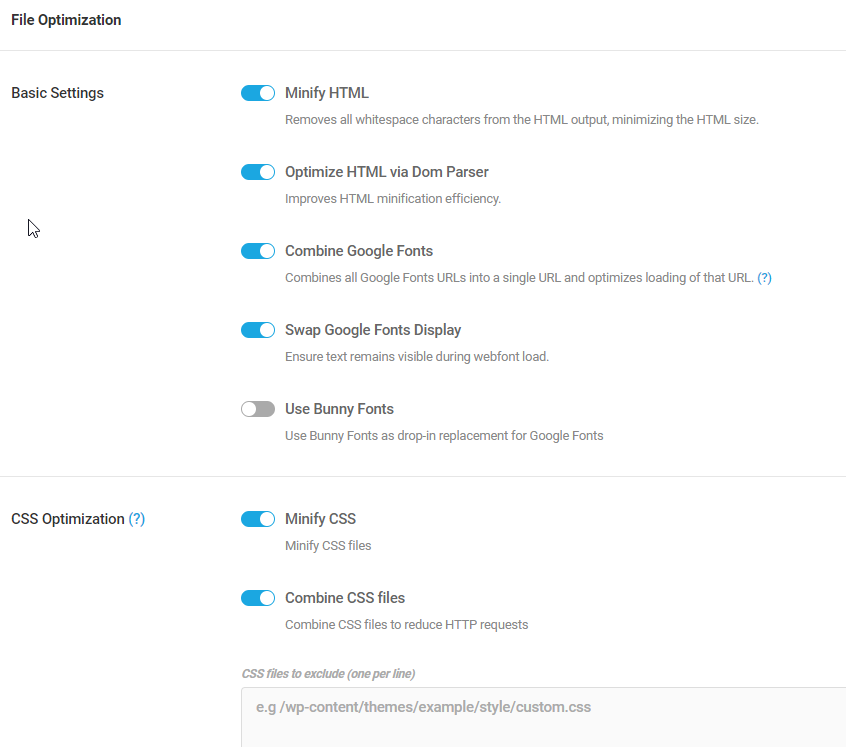
With the premium version, you get features such as image optimization, critical CSS, unused CSS removal, a Varnish add-on, Google and Facebook tracking, and more.
Yes, there are more I didn’t mention, but it is better than other popular cache plugins. Powered Cache isn’t just valid; it’s packed with features.
Some features feel like overkill, and the UI needs better organization. In my opinion, try the free version first; if it works, consider upgrading to Pro. Even so, I optimize WordPress sites with LiteSpeed Cache and FlyingPress, since nothing beats them.
7. SpeedyCache

SpeedyCache is a performance optimization plugin from Softaculous. It appears to be a copy of FlyingPress, with a UI reminiscent of the old version.
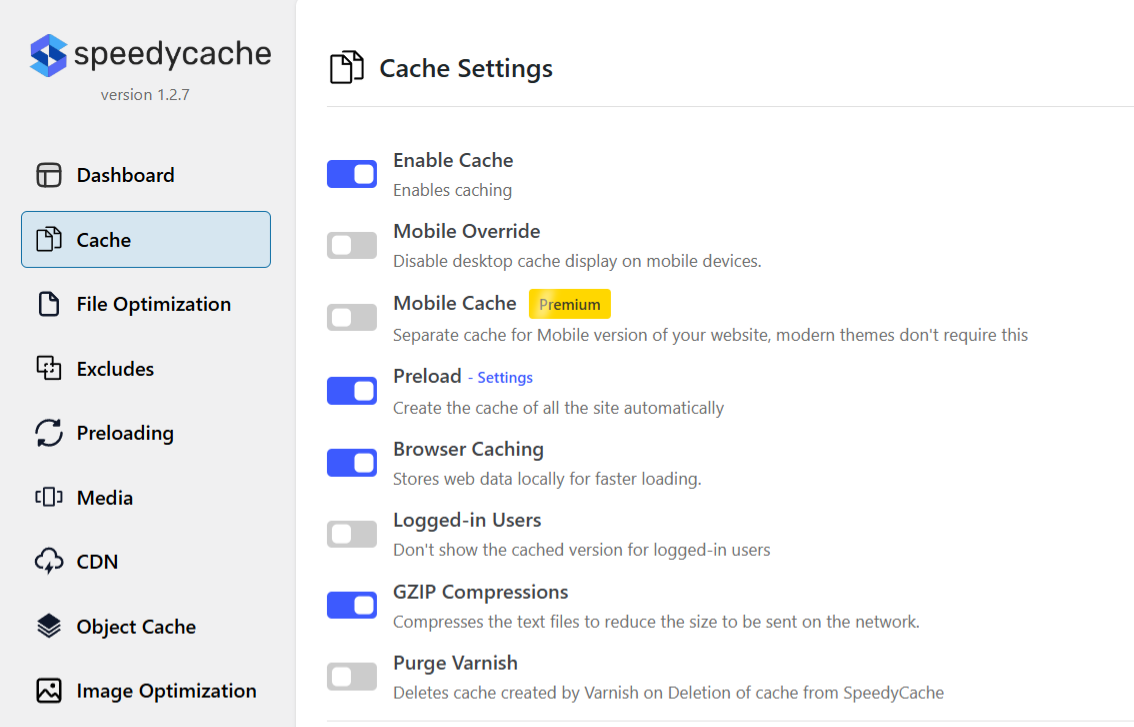
As I type this, it’s got over 500,000 active installations. The free version has limited functionality; to use more features, you will need to upgrade to the paid version.
Unfortunately, I didn’t get satisfactory results with SpeedyCache. I feel it is nothing more than a display trick and doesn’t perform as well as FlyingPress and LiteSpeed.
At first glance, it seems decent with features like object caching and Varnish. It’s not the worst plugin out there, but it’s not exceptional either.
Compared with the first three cache plugins, I didn’t notice any unique features in this one. Don’t just take my word for it; try for yourself.
Final Thoughts
I know there are plenty of WordPress cache plugins, both free and paid. I’ll add them if I find anything relevant. Also, I consider FlyingPress my number one paid caching plugin and LiteSpeed Cache my favorite free plugin. And WP Rocket is still a decent option.
I recommend Cloudflare APO with all those plugins, since it caches full pages in the Cloudflare Edge Network. Or you can use CDN-integrated hosting.
I didn’t include these WordPress cache plugins because:
| Plugin | Description |
|---|---|
| Swift Performance | It’s an aggressive plugin that performs well but can be difficult for beginners to navigate. That’s why I didn’t include it. It is free to use if you know how to access it. |
| Cache Enabler | It is an old plugin, and there is no reason to use it today. Yes, it’s simple, but better options exist. |
| Hummingbird | A vivid UI plugin from WPMU DEV. It is attractive, but it doesn’t perform as well as others and feels cluttered. Even some basic features are restricted to PRO subscribers. |
| Speed Optimizer | Cache plugin for SiteGround hosting; there’s nothing impressive about SG Hosting or SG Optimizer. |
| W3 Total | Definitely the most annoying cache plugin I’ve ever seen. There are many ways for average users to crash websites. |
| Fastest Cache | An old plugin that is no longer useful; despite its simple appearance, better alternatives exist. |
| Super Cache | A cache plugin without any optimization. It’s from the WordPress core team, and it’s a waste of time. |
| 10Web Booster | Similar to NitroPack, it’s expensive, but you get Cloudflare Enterprise and don’t even bother with the free version. |