
WordPress CDNs cache your website’s files at different points of presence (POPs), so users can access them faster, which speeds up images, CSS, JavaScript, and other assets. But I won’t get into what a CDN is or how it works; you probably know that.
When choosing a CDN for WordPress or WooCommerce, start by determining how much bandwidth you need; then decide which assets to cache based on their size, since not everything on your site is suitable for caching.
Imagine you don’t use a CDN, and you host your website in India, with all your readers connecting from that location. Users in India and South Asia get fast load times. But visitors from faraway places like the US get slower page loads. Loading files from a farther location takes longer than receiving them from a nearby location. This delay often increases a site’s time to first byte. For example:
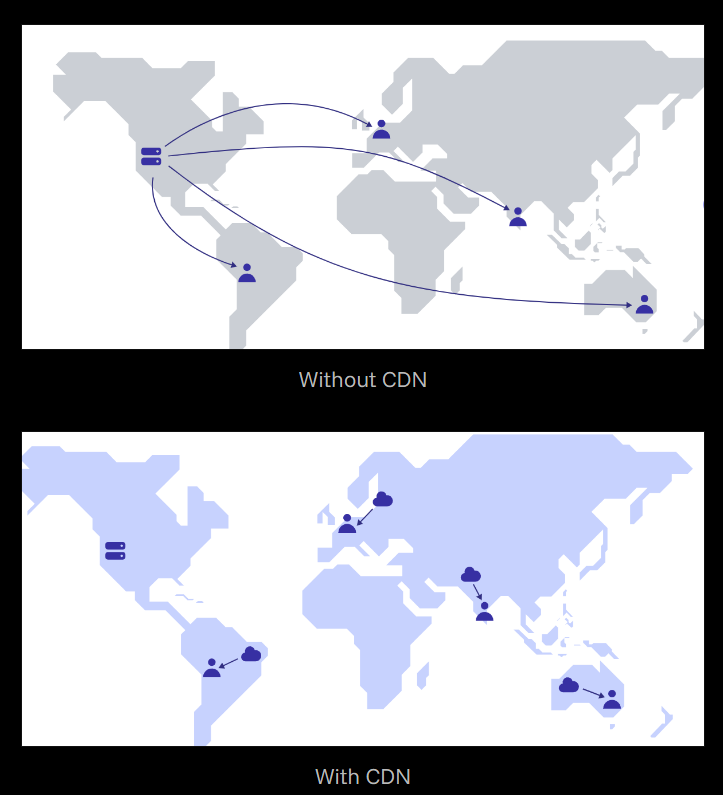
With a CDN, you can set your WordPress site to cache static files, and the provider serves those files from its POPs, often using hostnames such as cdn.example.com (you can also use a custom hostname). The CDN then routes users to the nearest POP based on location, and visitors connect to a nearby EDGE rather than the origin server.
When people visit the site, your domain brings up the main content, and the CDN hostname handles the rest of your site’s files. But that’s not the case with Cloudflare. CDN Planet is a helpful website for comparing/understanding CDN and their performance. Meanwhile, let’s compare some top WordPress CDN providers:
1. Cloudflare

Cloudflare may be the best CDN for any kind of website. I’ve used all their plans, from free to enterprise. Unlike others, Cloudflare CDN doesn’t copy files to separate URLs. Instead, it mirrors them through the proxy (delivering them to users). This is mostly because Cloudflare maximizes website load times by operating at the DNS level.
A traditional CDN copies your website files to its POPs and serves them using CDN addresses such as cdn.EXdomain.com.
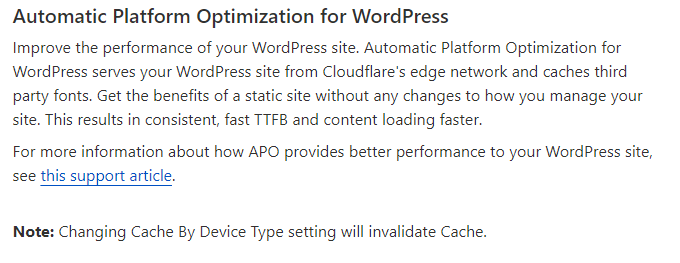
Using Cloudflare, you can change your NS records to point to Cloudflare and load your static and dynamic assets (Automatic Platform Optimization) from the nearest servers.
This process is ideal because I don’t want to split hostnames. Unlike all other CDNs, Cloudflare offers a free tier. Also, Cloudflare is a reliable DNS provider. Fast DNS is crucial for low TTFB, as DNS and network latency significantly impact website speed.

Cloudflare APO:
With APO, you can dramatically reduce TTFB, load time, and other site speed metrics for visitors far from the origin server. It allows you to maintain fast website speeds regardless of your web host or server. Even with Cloudflare’s free plan, Automatic Platform Optimization is an effective way to speed up your WordPress website.
Most CDNs serve static assets (images, CSS, JS, etc.) from their edge network, but caching HTML at the CDN boosts your site’s speed because most of the content is served from it. And the cache hit rate will exceed 90%.
You’ll need to get a key and add it to Cloudflare’s plugin (make sure caching is enabled), as the plugin caches locally and APO sends it to the edges. Because these are distinct caching types, you need to allow both.
Cloudflare Pro: A decent pick for an average site if $25 per month isn’t a problem (ideal if you want to personalize settings to your preferences).
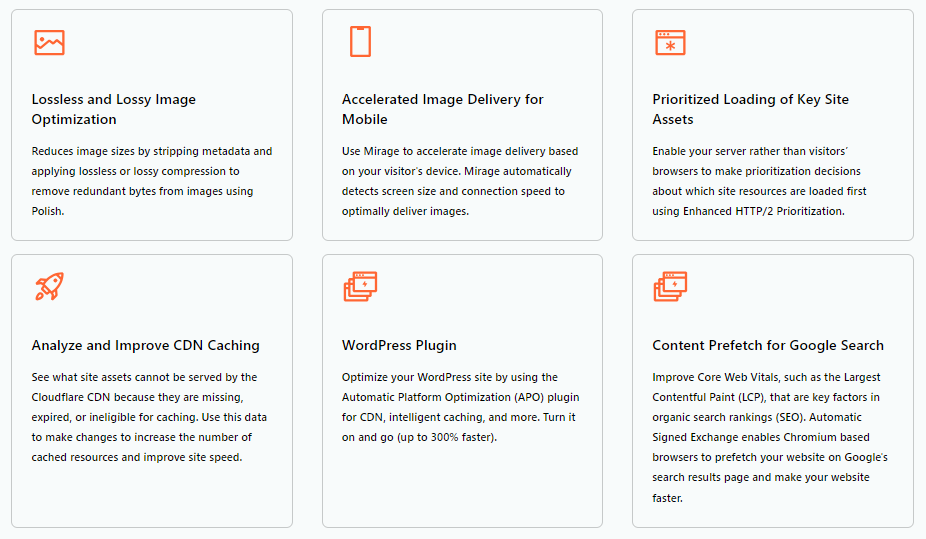
It features several useful tools, including Polish-Mirage image optimization, prioritized loading, CDN monitoring, and platform optimization (APO).
Enterprise: Websites don’t need Cloudflare Enterprise, but it delivers top optimization for both performance and security. You’ll get all the features. Yet, it costs over $5,000 if you buy it directly. But you don’t have to purchase it directly anymore; multiple service providers have built WP CDNs that leverage Cloudflare Enterprise. Many providers offer Enterprise CDN, including FlyingCDN, Rocket.net, BigScoots, and 10Web Booster.
Argo Smart Routing:
APO and Argo Routing are two paid services that I would use on Cloudflare. Argo routes traffic along the optimal network path and identifies issues within the CDN.
Cloudflare states that Argo reduces latency by 30% and connection failures by 27%. YES, you can see actual performance improvements with Argo.
Cloudflare might not be the fastest CDN for WordPress sites, but its additional features can increase page speed. Argo+APO improves TTFB and overall UX, especially suitable for e-commerce and multi-page websites. The process shortens the distance between your server and visitors, reducing requests to the origin and increasing CDN cache hits.
2. FlyingCDN
FlyingCDN is the official CDN for FlyingPress and an automatic CDN powered by Cloudflare Enterprise. Cloudflare isn’t a typical CDN, but it works effectively through proxies. Content delivery networks typically deliver content to visitors, and FlyingCDN does so exceptionally well by leveraging Cloudflare’s 300+ edge networks.
FlyingCDN can reduce reliance on many paid WP plugins, including security, image, and other optimization features, as it includes these capabilities by default.
And here are some critical features:
- Full-page caching: Cache entire pages at the edge to deliver content faster, along with other Cloudflare enterprise features like smart routing, early hints, tiered caching, etc. It still caches pages even when items are in the user’s cart, and caches other pages for signed-in users. Rocket.net uses C-enterprise with many features.
- Optimizing images: Optimize images with Polish without reducing quality; convert images to WebP in the background without changing URLs.
- Security Features: Integrated firewall with protection against DDoS attacks and malicious traffic, plus a free wildcard SSL certificate for any subdomain.
- Manage traffic spikes: 300+ edges reduce server load, make traffic spikes easier to manage, and deliver faster. (Good for WooCommerce sites).
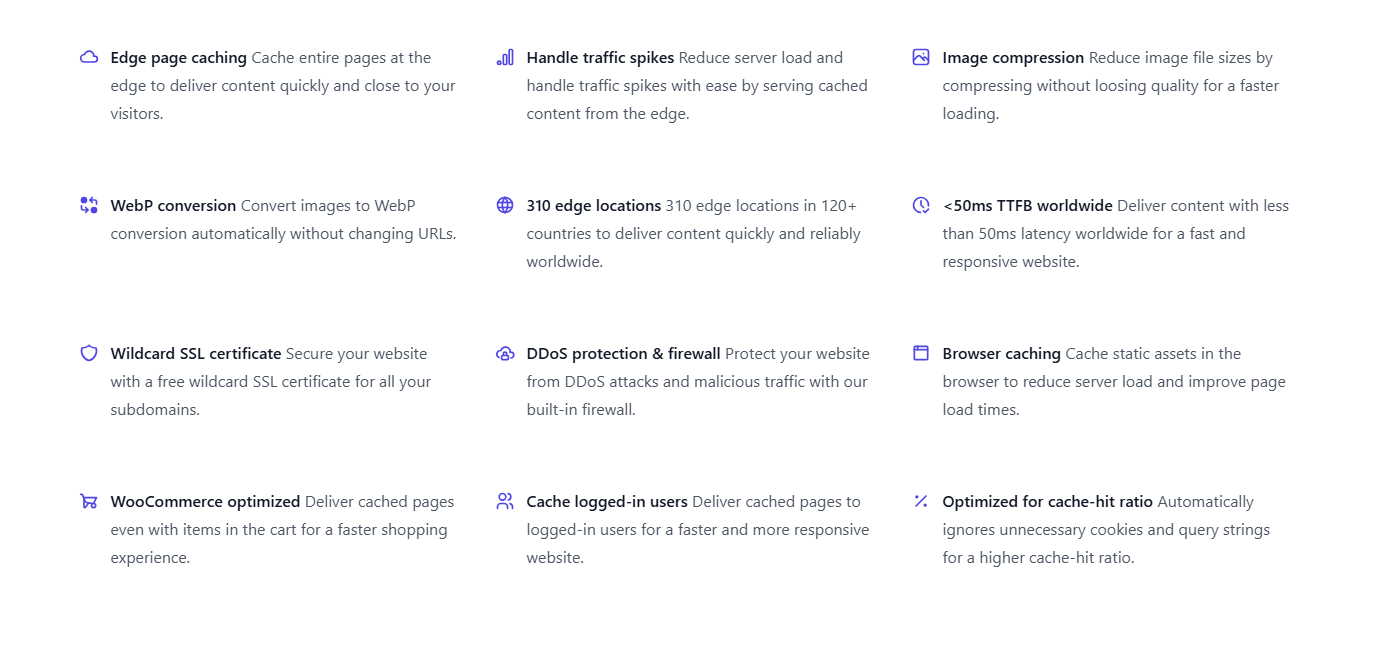
FlyingCDN is one of the best WordPress CDNs, and it is cheaper than others. It offers enterprise-level features you won’t find elsewhere.
You can use FCDN for free for 7 days without a credit card. One website costs $10/m and includes 100 GB of bandwidth; EXTRA bandwidth costs $5 per 100 GB.
FlyingCDN has other features I didn’t mention in this post, but it also has drawbacks, such as not allowing users to change settings and requiring the FlyingPress plugin.
It can improve page speed (images, CSS, JS, fonts, and other elements) when you use a VPS or dedicated server from providers such as DO, Vultr, or UpCloud.
Compared to larger hosting plans, a CDN is less expensive. Also, they offer a hosting service, “FlyingHost,” so you don’t need a CDN or FlyingPress if you’re on it.
3. BunnyCDN

BunnyCDN is a solid option for devs and publishers, but it lacks full-page caching for WordPress, though you can use it with Cloudflare APO.
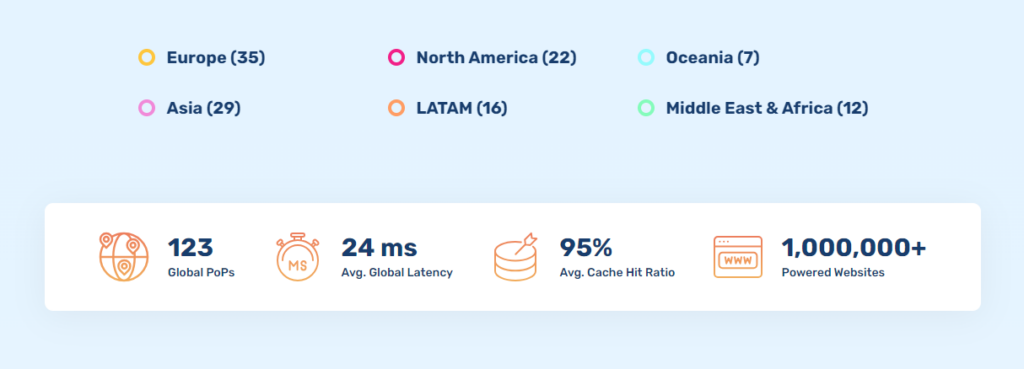
In addition to ranking highly on CDNPERF, BunnyCDN offers large edge networks. BunnyCDN has more than 120 global POPs, with over 30 in Europe and 38 in America.
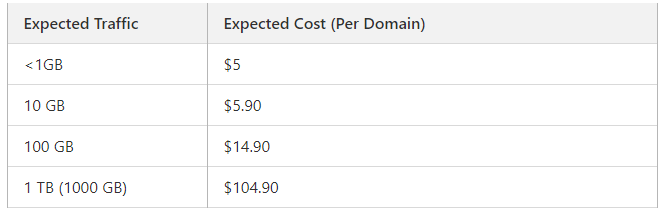
It is highly cost-effective, with pricing lower than other content delivery networks. Prices depend on location. If you don’t receive traffic from certain regions, such as South America or Oceania, you can block them. Using Bunny’s traffic manager, you can select, reroute, or exclude specific countries.

If you consider where your visitors come from and how expensive your bandwidth is, you can estimate your approximate monthly bandwidth cost.
You can set up Bunny using the BunnyCDN plugin. Go to advanced settings to add your access key, which lets you clear the cache directly from the dashboard. It can boost the CDN to serve more content. If not, you can add the pull zone with your cache plugin.
BunnyCDN Perma-Cache: (Perma-cache AKA geo-replication). When this setting is active, Bunny will routinely copy web files to the designated storage locations.
You will need to select the specific regions where you would like your files duplicated. Pick locations that get heavy traffic. Most requests won’t go to the origin server; the nearest zone will pull assets, increasing cache hit ratios and reducing latency.
BunnyCDN incurs an additional cost, and I prefer full-page caching over perma-caching. You can use full-page caching with cloud hosting control panels.
Bunny Optimizer: This is another extra-cost feature, but it’s worth it since it doesn’t use server resources like most asset and image optimization plugins; it costs $9.50/M
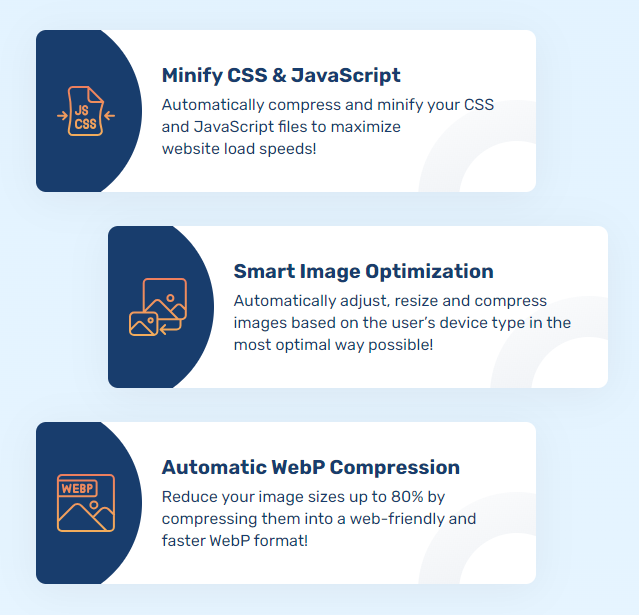
Optimizer offers several features, such as image optimization and CSS/JS minification. So, BunnyCDN is ideal for WordPress users, but its features come at an extra cost. It’s your choice, but I prefer Cloudflare and FlyingCDN.
4. QUIC.cloud

If you use LiteSpeed, QUIC.Cloud is a suitable CDN with additional security features. It’s the first WordPress CDN to support full-page caching.
It is designed for LiteSpeed and has grown its edge locations with dynamic caching. If you know your way with these things, you can totally set up and tweak all the settings. QUIC.Cloud isn’t as appealing to me as LiteSpeed Cache.
You can get QUIC.Cloud for free, but the free plan only uses 6 points of presence and lacks DDoS protection. Paid plans provide access to more than 80 venues with attack protection. Bandwidth costs $0.02-$0.08 per GB in USD under the paid plan.
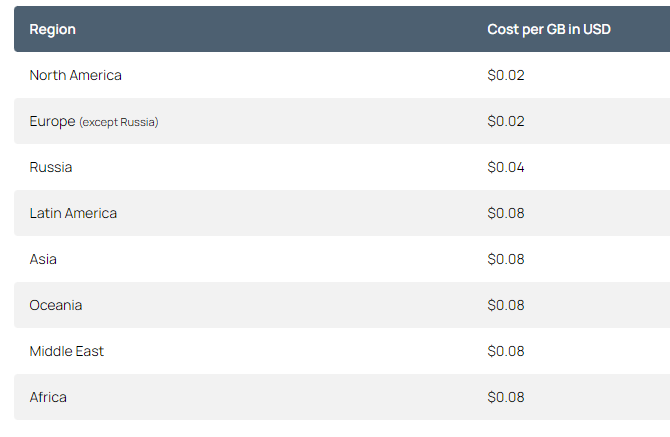
QUIC.cloud’s key benefit is caching dynamic content (improving TTFB worldwide). You get native HTTP/3 support, which optimizes images and pages and handles critical CSS and low-quality photos.
QUIC provides additional security features, including brute-force defense, CAPTCHA, security measures, and XML-RPC restrictions. On your QUIC.cloud dashboard, you can view all the statistics, and the LiteSpeed plugin lets you activate these features.
Most WP cache plugins support CDN integration. I don’t think QUIC.cloud is attractive or easy for the average person to set up. Although it doesn’t work as well as other Cloudflare integrations, using LiteSpeed Cache may make it more useful.
5. KeyCDN

KeyCDN is another well-known European content delivery network. It feels a bit old-school since it doesn’t have page caching, and the interface isn’t modern.
Plus, they rarely update their features or content, which makes it clear it’s time to look for something fresher.
KeyCDN doesn’t appear on performance or comparison sites like CDN Planet. Yes, it’s pricey and has fewer POPs than Bunny or Cloudflare.
Most of KeyCDN’s POPs are in Europe and the US. If most of your traffic comes from the US, the UK, or the EU, KeyCDN is a reliable choice given its performance.
KeyCDN costs: The minimum monthly fee, which applies even if you’ve never used the service, makes it expensive. Moreover, there’s a $50 minimum top-up cap. BunnyCDN is almost the lowest possible annual cost.
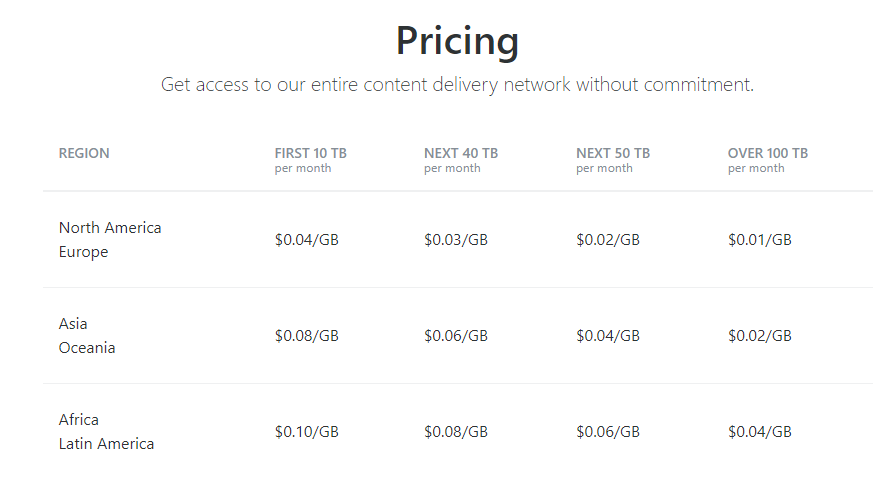
You can try KeyCDN for free for 14 days with no payment required, but its pricing is significantly higher than BunnyCDN, FlyingCDN, and others.
BunnyCDN, however, is more economical, offers 120 POPs, and provides an optimizer to boost your website’s static assets. So, KeyCDN is good, but Bunny is still better due to its features. KeyCDN is suitable if your target audience is in the EU or the US.
Finally:
- KeyCDN has many active POPs in Europe and the US.
- Setup is uncomplicated, offering a CDN integration plugin for WordPress users.
- Paid image optimization gives you all the features you can’t get in WP plugins.
- It has helpful documents, blog posts, and FREE measurement tools.
- Bot protection, SSL, custom robots.txt, and blocklists are security features.
6. Gcore

Gcore is a cloud platform like Cloudflare, with a free plan that includes 1 TB of monthly bandwidth. It has over 200 POPs across ALL continents, making it reliable worldwide.
Yes, it has full-page caching, but it is not as easy to set up as Cloudflare. It includes Anycast DNS and has a free tier.
But I don’t recommend Gcore for small sites; the free plan doesn’t include optimization features. Gcore has a WordPress plugin for its CDN service, similar in design to the BunnyCDN plugin, but it hasn’t been updated in three years.
With it, you can choose which file types to cache and even pick specific files. You can also list files that shouldn’t be cached by entering their URLs.

The dashboard is polished but not easy for new users. Like Cloudflare, Gcore offers 4 CDN plans, from free to enterprise. Unlike Cloudflare, Gcore separates content delivery network and security, so you need a separate plan for advanced website security.
Finally, Gcore suits large websites that need features like origin storage, on-demand video, and extensive image delivery support. If you have a simple website, you should use Cloudflare Free; it’s more than enough.
7. RocketCDN

RocketCDN is part of the official WordPress CDN for the WP Rocket cache plugin, but you can use it even if you’re not a WP Rocket client.
RocketCDN previously served static files from StackPath but now uses BunnyCDN. It is only bound to delivering static files from BunnyCDN, nothing else.
WP Rocket now offers a free CDN, enabling you to accelerate three key pages across 10 edge locations with no bandwidth limits.
Unlike Cloudflare or other modern content delivery networks, it doesn’t cache full pages; instead, it accelerates image delivery and uses 120 edge locations.

In a nutshell, RocketCDN is more expensive than Bunny and FlyingCDN. The only thing is that you don’t need a complex setup like Bunny. If you use Bunny directly, you’ll need to do some manual work. You can customize things with it and host more sites. I don’t see any enhancements in RocketCDN. It’s just a CDN (I don’t see any reason to use it).
8. Jetpack CDN

Using the Automattic free content delivery network, you can use Jetpack to deliver your images and static files. Jetpack uses Automattic’s CDN, but I don’t suggest using it.
It is slow and lacks features you’ll likely find useful. It has a lot of autoloads. A CDN is essential for optimizing websites, but plugins like Jetpack are not ideal for any site, as they can slow it down with bloated features.
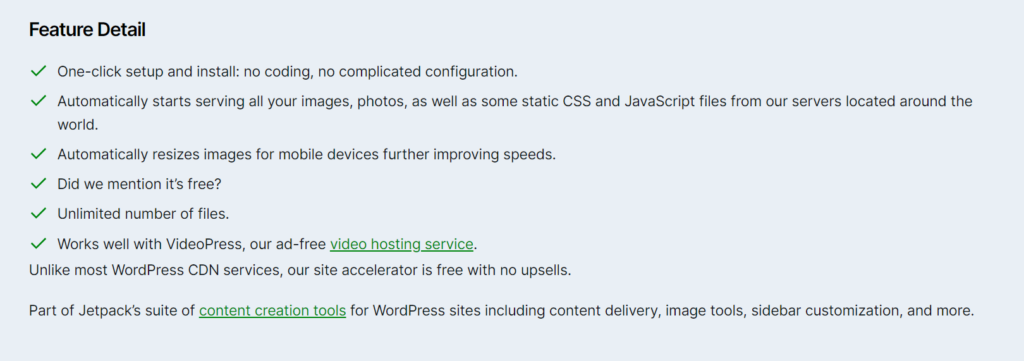
Jetpack CDN FACTS:
- Mobile-friendly image resizing.
- Features and bandwidth usage aren’t visible to users.
- Free CDN services are available to all users, regardless of their site’s size or traffic.
- You cannot customize any aspect of the website or its options.
- Automattic doesn’t share information about its CDN POPs or how many it has.
Jetpack CDN isn’t really the best pick for most users. You might want to try Cloudflare’s free service instead. Yes, it is a free CDN for WordPress, but it requires the Jetpack plugin, which isn’t a good fit due to its unnecessary features.
Final thoughts
A WordPress CDN benefits every website. Cloudflare, FlyingCDN, and BunnyCDN are the best WordPress CDNs nowadays. Often, premium WordPress hosting comes with a built-in CDN or offers it as an add-on, so you won’t need an external CDN.
Still, you don’t need one unless your website has plenty of global visitors or is minimal and doesn’t require more setup. When your server can’t handle your website load or isn’t fast enough, a CDN reduces the load on your web server. From a performance view, you only need a CDN if your traffic comes from a notable distance. If you get a lot of traffic from overseas, I mean outside your country.
You probably don’t need a content delivery network if most visitors are in your country or a nearby one. But it is helpful if your site has many plugins and themes.
From a security standpoint, if you have a popular website or anything vulnerable to spammers, even a free Cloudflare plan can make a difference. Most CDNs have built-in security features, including anti-malware, firewalls, and DDoS protection.