
DigitalOcean is a leading cloud computing provider (basic virtual servers to powerful cloud GPUs). DO offers droplets (VS) with an SLA, built-in security, and predictable pricing; it’s like a mini server, but you can use it independently or in a bigger setup.
You should buy virtual machines from a provider that does not offer shared hosting. It’s because shared hosting often overfills their servers, leading to frequent outages and poor performance.
I like the DO control panel because it is stylish… easy to connect to other control panels, and more reliable than other cloud options.
There are occasional downtimes and slow hardware upgrades, but I still see DO as a solid choice. It has poor ratings for customer service and for improperly shutting down clients. So, if DigitalOcean doesn’t fit your needs, try these competitors.
1. UpCloud
UpCloud is a Finnish cloud computing company with global operations, offering high performance at reasonable prices and an industry-leading service level agreement.
There’s a decent support team, and they’re friendly. Although they have a nice UI, it doesn’t compare favorably to DigitalOcean, and the web console is a mess.
Their servers range from simple to private cloud; for most websites, developer and general-purpose plans are sufficient. You can use an entry-level VPS for low-traffic websites, as caching plugins and CDNs can significantly increase performance.
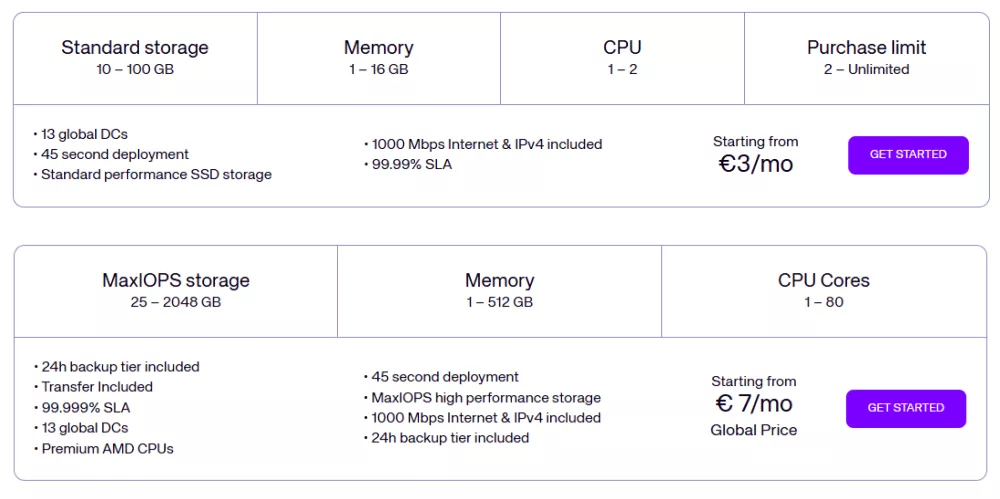
Developer plans are well-suited for personal projects (the 1st plan includes 1 GB RAM, 1 core, and 10 GB of storage for less than $4/m).
General-purpose plans offer balanced resources for most uses. Basically, the same as DigitalOcean’s AMD droplets and Vultr’s high-frequency servers. For under $8/m, you get 1 GB of RAM, 1 core, and 25 GB of storage. There is a price difference between global and Finnish prices; global prices are lower, possibly due to tax differences.
The difference between dev and general-purpose plans is that developer plans use SSDs and older CPUs, while general-purpose plans use AMD processors and MaxIOPS.
UpCloud’s support is better than DO’s, but its UI isn’t user-friendly and offers performance and pricing close to DigitalOcean’s; it operates fewer data centers, whereas DigitalOcean has a global presence.
Key facts about UpCloud:
- Reasonably priced: developer plans are affordable, but the rates for UpCloud’s other plans are roughly the same as DigitalOcean’s.
- Money-back guarantee: in addition to free credit, they offer a refund policy that lets you get a refund for your first payment.
- Friendly support: if you have questions or need help troubleshooting, you can reach out via chat or submit a ticket.
- Insufficient data centers: most are in Europe and the US (Only one in Asia, none in Latin America or Africa).
- Poor UI: UpCloud’s client interface is less user-friendly than those of other platforms, and its built-in SSH interface is poor.
2. Vultr
Vultr is a leading cloud provider and one of my favorites. DigitalOcean has only 13 data centers, while Vultr has 33 across every continent. Both hosting platforms have similar features, but Vultr’s web console is unusable. I’ve already written an article about Vultr. It is DO’s largest competitor, and its prices and performance are pretty comparable.
You can get everything from VPSs to bare-metal GPUs with Vultr, and they offer three VPS types: regular, high-performance, and high-frequency.
The high-frequency servers are cheap and can handle significant traffic with minimal CPU impact. I noticed that DigitalOcean’s AMD droplets offer similar performance for a slightly lower price.
Regular performance servers are run on old Intel CPUs and SSDs. Usually cheap, you can get 1 vCPU, 1 GB RAM, 1.00 TB bandwidth, and 25 GB SSD for $5.00/month.
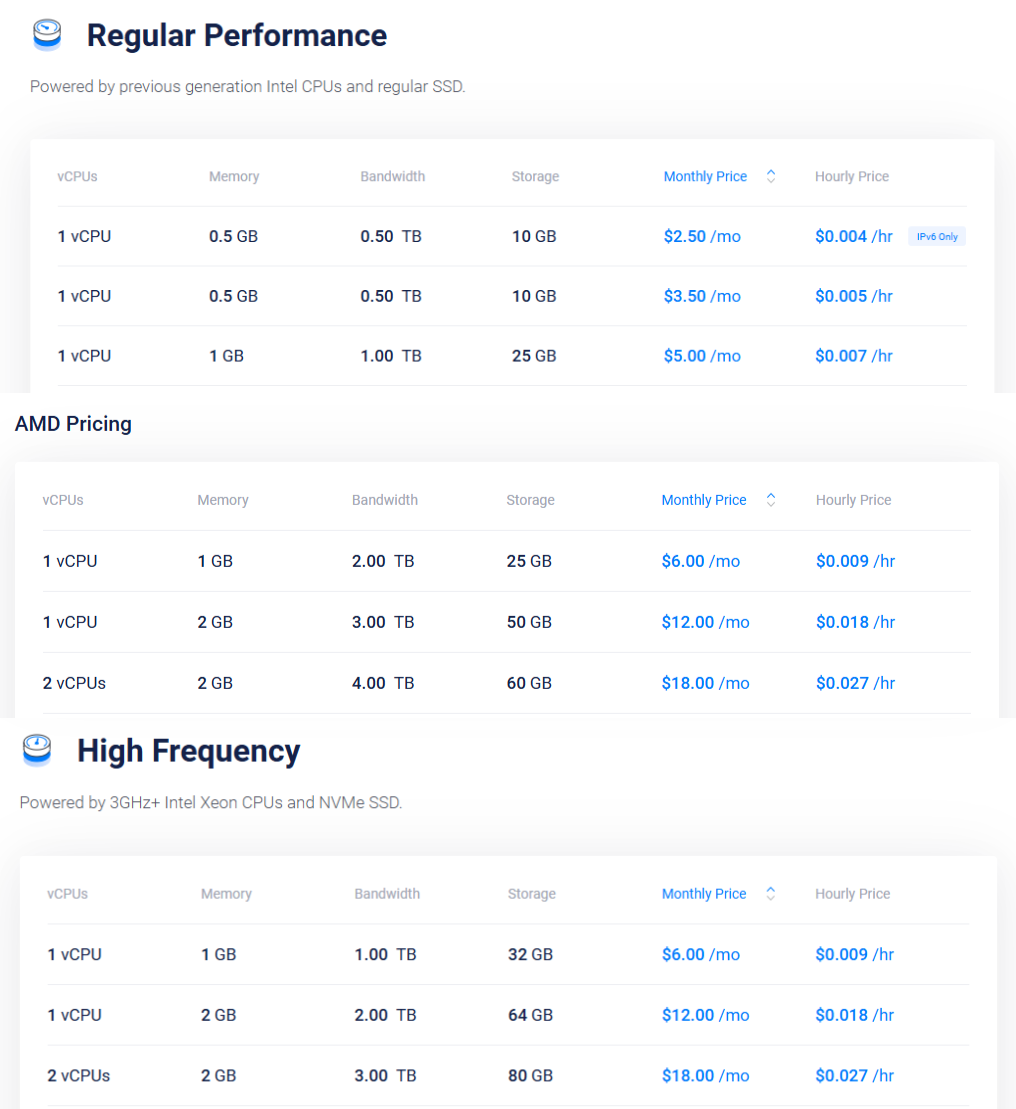
Vultr’s high-performance or high-frequency servers are the best choice for hosting a website. Particularly high-frequency servers with Xeon processors clocked at over 3 GHz. Start with 1 CPU, 1 GB RAM, 1 TB, and 32 GB NVMe for $6.00/month.
Key facts about Vultr:
- Feature-packed control panel: A third-party panel is unnecessary because the system includes key web server management features.
- Modern stacks: If you want to use different configurations, you can install OSs such as Debian, Ubuntu, Rocky Linux, Windows, or Fedora. You may also set up WordPress with OpenLiteSpeed on Ubuntu or use Drupal and Joomla.
- Payment flexibility: You can pay by card, PayPal, bank transfer, or crypto.
- Unusable web console: Unlike Lightsail, Linode, or DigitalOcean, Vultr’s built-in SSH terminal is a mess. That’s my biggest issue with Vultr.
- Paid DDoS Protection: DDoS protection is typically included as standard, but Vultr charges an additional fee. (It costs an extra $10 per month).
3. Kamatera
Kamatera is another established cloud hosting company that offers budget-friendly servers at half the cost of DigitalOcean. It’s solid, with no major downtime reported. As a regular user, I have no negative thoughts about the value for money of their VPS.
All Kamatera data centers charge the same rates, with no unexpected fees. For $10 per month, you get 2 cores, 2 GB RAM, 20 GB storage, and 5 TB of traffic. They’re ideal for general-purpose apps that don’t need guaranteed CPU power. But Type A CPU VPS plans may show high CPU usage, especially with 1/2 cores. And you can launch a server on an hourly/monthly basis and customize your VPS to select the resources you need.
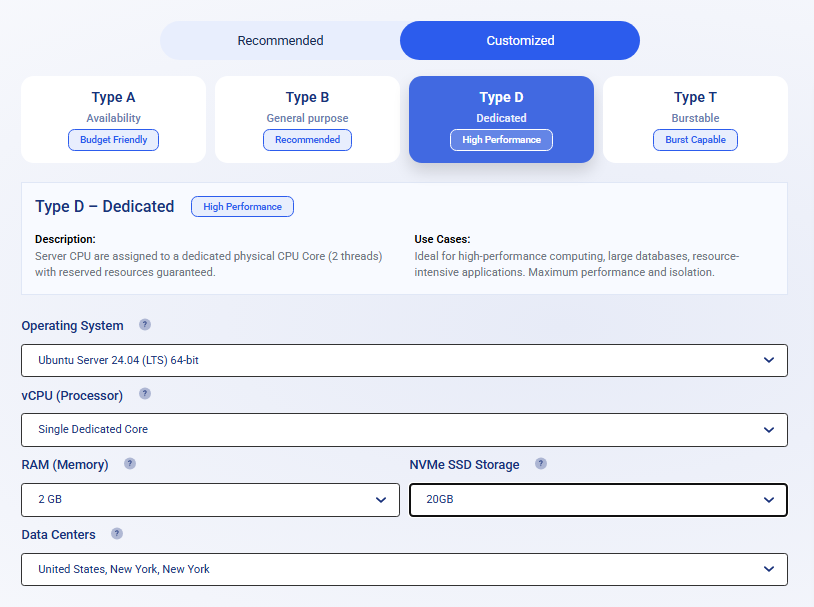
If you require a dedicated CPU for demanding websites, Type D VPSs are ideal. While they are more expensive, they can effectively support dynamic or high-traffic sites.
Kamatera’s control panel is fine, but not as modern as its competitors, and the web console is awful. Despite having over 20 DCs, none are in South America or Africa. Yes, it is a solid alternative to DigitalOcean and Vultr, as it remains affordable.
Key facts about Kamatera:
- Cheap: clearly, this is Kamatera’s most significant advantage, and you can save half on server costs compared to UpCloud, Vultr, DigitalOcean, etc.
- Decent performance: the server performs well and is comparable to major brands, despite its low price.
- Customization: choose RAM, CPU, storage, and bandwidth to your needs.
- Outdated control panel: Kamatera’s user interface appears outdated compared to modern alternatives. The server management features are fine, but navigation is difficult, and the built-in terminal is a mess.
- No data centers in some regions: they have over 20 data centers; however, none are in South America or Africa, and only 3 are in Asia.
4. Krystal Cloud

Formerly known as Katapult, the service has now merged with Krystal Hosting and operates as Krystal Cloud. I have no complaints about performance, especially their dedicated vCPU hosting, which is notably fast and easily handles heavy traffic.
If you sign up first, you’ll get £100 free credit. Although the signup process isn’t user-friendly, it may require verification. Krystal Cloud looks expensive, and yes, it’s a lot pricier than Kamatera and Spaceship VPS. Krystal Cloud uses modern hardware with AMD EPYC processors, making it well-suited for high-performance workloads.
The control panel features a well-designed client area that makes navigation easy. The graphical and metric displays provide clear monitoring of VPS hardware usage.
But the issue with that control panel is that the web console is really disappointing. There are currently four Krystal data centers (London, Amsterdam, and two in the US), so it’s not ideal for all global users. Regular or dedicated CPU servers are usually suitable for all types of websites. Their servers are updated with the latest tech.
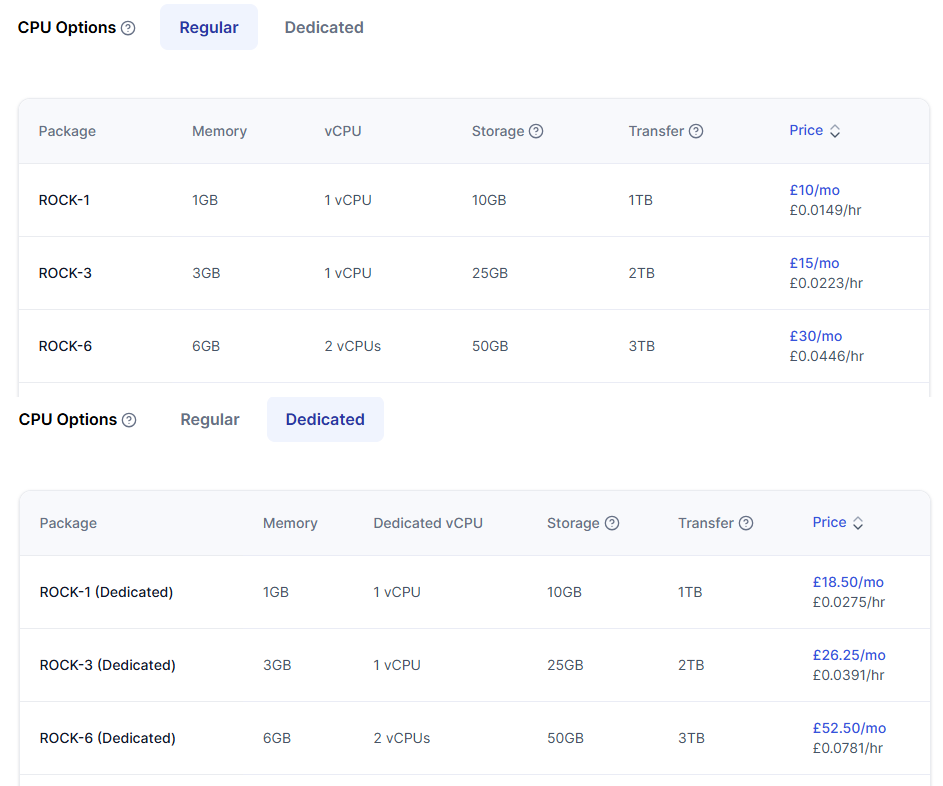
Standard servers start at around $10/month for 1 GB RAM, 1 vCPU, 10 GB NVMe, and 1 TB bandwidth. So, dedicated CPU servers are pricier but guarantee resources.
Key facts about Krystal Cloud:
- Rich control panel: a cool interface for managing cloud servers; you’ll find more modern features, stunning graphs, and metrics.
- Solid performance: although prices are high, I have no concerns about the performance, and dedicated CPU hosting offers robust performance.
- Expensive: decent performance, but it’s really pricey compared to Kamatera, UpCloud, and Hetzner. The low-tier plans are even more costly than Vultr’s.
- Verification: users may need to complete a verification process and request account activation via email before accessing services.
- A few data centers: Krystal Cloud currently operates four in the US and Europe.
5. Hetzner
Hetzner is another popular German cloud provider known for its low prices, but it operates data centers in Germany, Finland, the USA, and Singapore.
Some users consider the services good value for the money because they have cheap dedicated servers, despite mixed reviews. But some say they experience poor service, billing issues, and technical problems. And their dashboard is quite outdated, too.
Despite being affordable, I’m not impressed with the performance. I agree with one thing: they’re affordable. I have only seen such pricing on Contabo.
For less than $5, you can get a shared VPS with 2 CPU cores, 4 GB RAM, 40 GB NVMe storage, and a notable amount of bandwidth.
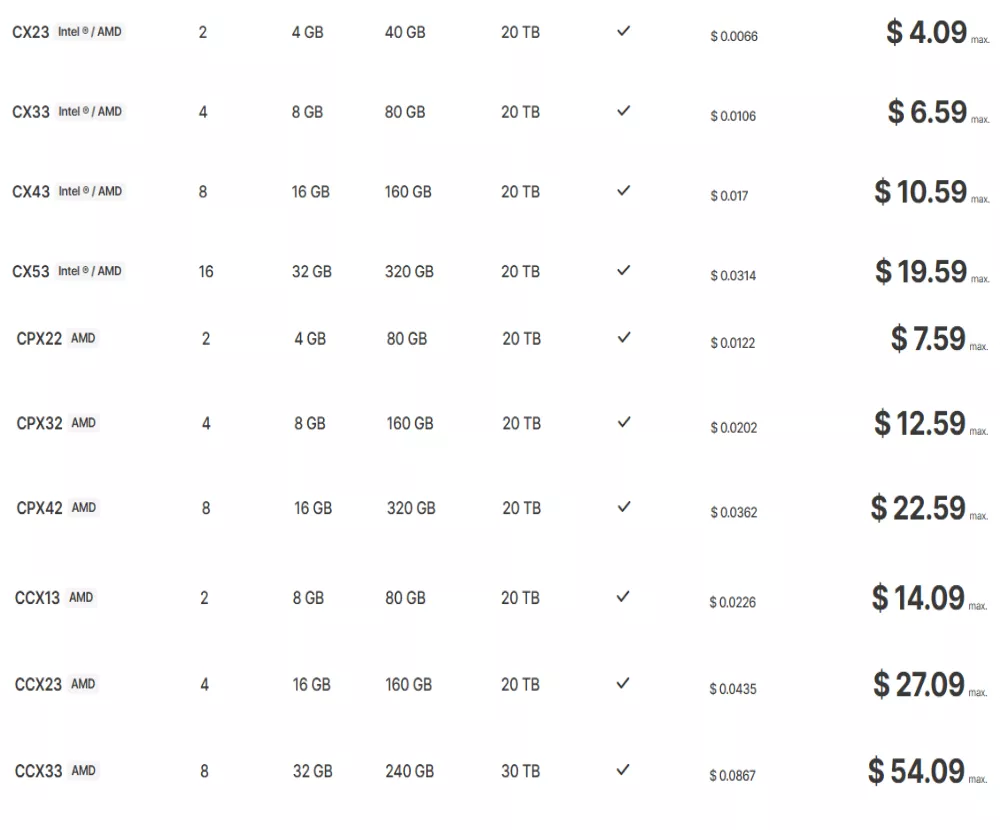
Dedicated hosting with 2 cores and 8 GB RAM is available for under $15 USD. That sounds good. It can handle a lot of traffic. But prices vary by location; servers in Singapore are usually pricier. Moreover, shared cost-optimized servers aren’t available in Singapore or the US. There’s at least 20 TB of traffic included for EU cloud servers.
If you’re eyeing heavy cloud hosting, especially in Europe, Hetzner is a decent option. Hetzner is a serious competitor, but not quite as sophisticated as DigitalOcean.
Key facts about Hetzner:
- Affordable: Hetzner is popular for its dedicated hosting, offering 2 cores and 4 GB of RAM for about $15 USD.
- A sufficient level of security: Hetzner offers some cool security features you usually won’t find with unmanaged cloud hosts.
- Fewer locations: operates only 4 data centers
- Prices vary by location: servers in Singapore are usually pricier.
- Poor support and UI: since they are cheap, you cannot expect high-quality support or a user-friendly UI. Additionally, the UI is outdated.
6. Amazon Lightsail

Amazon Lightsail is a popular virtual server service for average users. Although AWS is one of the world’s largest cloud computing providers, Lightsail is not as effective as some of its competitors. Still, Lightsail simplifies launching and managing VPSs.
You can set up a server within minutes, without complex steps. It is a suitable option for beginners eager to experiment with AWS and ideal for developers, freelancers, and fans running simple projects or testing different server configurations.
Despite its low price, the design and technologies are outdated. Lightsail’s interface doesn’t stand out compared to DigitalOcean’s. You can view server metrics, including CPU, RAM, and network usage, to calculate your web server’s stability.
Obviously, it can be helpful if you need to pair your AWS account with other services. The control panel isn’t very stylish, but it comes with critical features. It gives you the ability to deploy WordPress with Apache in one click and connect a domain to it.
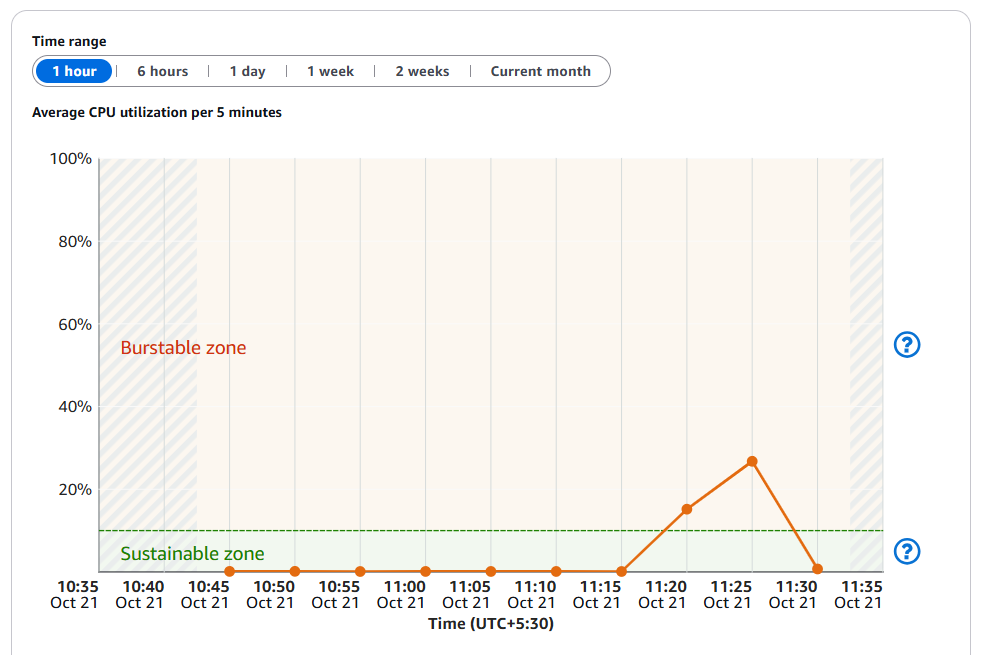
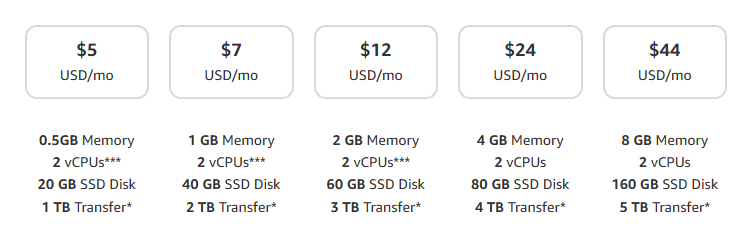
Lightsail has a specific monthly price, and you can easily see the cost when you choose a plan. You can find 2 GB of RAM, 2 virtual CPUs, and 60 GB storage for under $12/m. I think the price is competitive with DO, UpCloud, and Vultr.
Lightsail’s great if you’re new to AWS or need to get going quickly, but if you need more horsepower and know how to handle AWS stuff, go with EC2.
Key facts about Lightsail:
- Free Tier: A three-month free trial is available for specific plans.
- Simple SSH terminal: My favorite feature is the one-click SSH terminal. Therefore, you do not need to use a third-party SSH terminal such as PuTTY.
- Global data centers: It’s a big company, and you can pick locations all over the world. (3: North America, 6: Europe, 6: Asia Pacific.)
- Unattractive UI: If you prefer modern designs, the UI may not be impressive; however, if you’re not concerned about the UI, it is not a significant issue.
- Outdated: You will not find any modern features in Lightsail’s UI or hardware. I couldn’t find any info on the hardware, and the performance is average.
7. Contabo

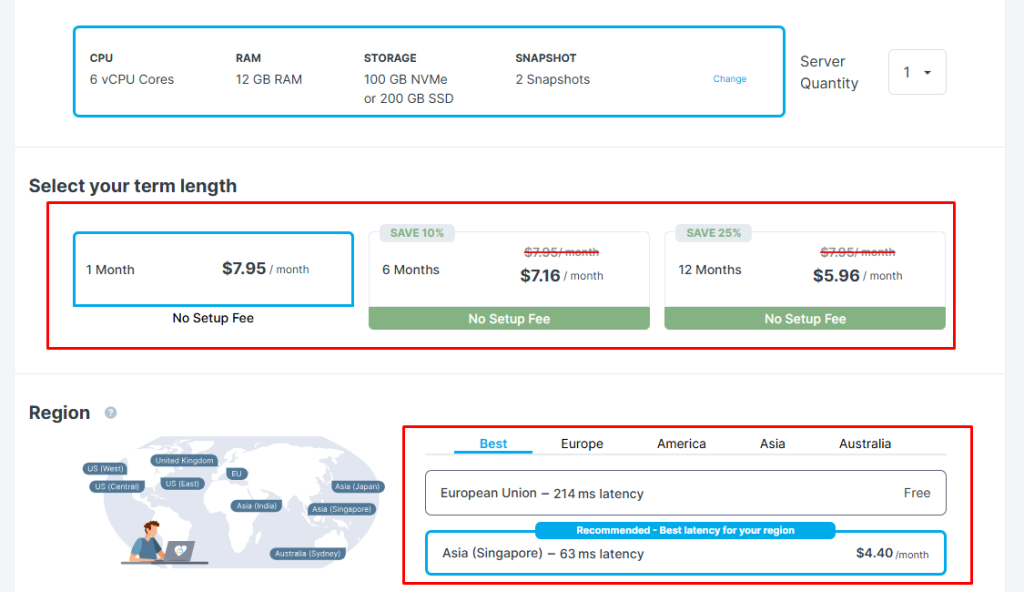
Contabo is a cloud host with unbeatable prices. Hetzer is the closest provider to this price, but Contabo is more affordable. You can get these features for less than $5, including 3 cores, 8 GB RAM, 75 GB NVMe, and 32 TB of bandwidth. Crazy, right?
Long-term deals are even less expensive. It is worth noting that there are location-based restrictions and pricing. In this case, choosing a German DC is normal, but selecting an Asian or US one will hike prices by up to 50%.
For example, the same server in Europe may cost $10 but $15 in India.
I have used their VPS in the German DC with no problems; however, there are notable negative reviews about downtime and customer service.
I’m sure people are using them without problems. They’re super cheap and have 9 data centers. Service is ideal for development conditions.
For professional websites, it is up to you to choose Contabo, which offers VPS and VDS. Their prices are lower than DigitalOcean’s, but some users have raised concerns about service quality.
Key facts about Contabo:
- Lowest price ever: unbeatable cloud hosting prices, for under $5, you get 3 CPU cores, 8 GB RAM, 75 GB storage, and 32 TB bandwidth.
- Hosting for Blockchain: hosting companies rarely offer blockchain hosting.
- Developer-oriented features: get real root access to customize your deployment process with custom images, cloud-init, and SSH keys.
- Many complaints: support and downtime issues make it unpredictable for demanding workloads.
- Server location affects prices: higher outside Germany.
8. ScalaHosting

ScalaHosting stands out with unique features compared to DigitalOcean and Vultr. Offer both regular managed hosting and unmanaged virtual servers. They’re well known for their high-performance VPS offerings, both managed and unmanaged.
IMO, the biggest benefit of ScalaHosting is free access to Spanel. This panel offers many features similar to cPanel, but its interface is clean and easy to use.
But Scala does not have smaller VPS options. The minimum configuration includes 2 cores, 4 GB of RAM, and 50 GB of NVMe storage, and you can’t purchase servers with only 1 GB of RAM and 1 core. Their target market isn’t smaller users like us, 😜 Even though Scala lets you build your own VPS profile, you still can’t set up small VPSs.
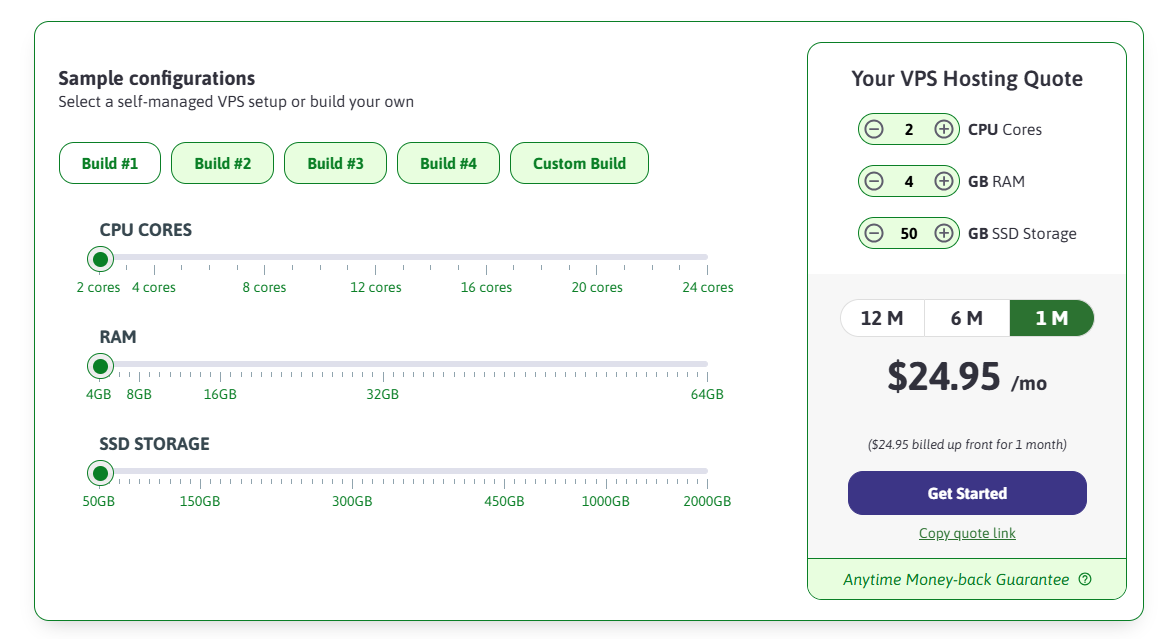
ScalaHosting is designed for serious and long-term customers. You can get 2 CPUs, 4 GB RAM, and 50 GB NVMe for less than $25 a month. Still, Scala remains less costly than managed hosts, such as WP Engine, RocketNet, and FlyingHost.
Long-term deals are even more affordable. You get a refined control panel for free. Trustpilot reviews show that Scala’s support outperforms competitors.
Scala has multiple combined global data centers and is a competitive alternative to DigitalOcean, UpCloud, and Katapult, among others. But it doesn’t offer a small VPS.
Key facts about Scala:
- Free SPanel: a big plus is that all Scala VPSs come with SPanel, which works well as an alternative to cPanel and other enterprise options.
- Build your own VPS: you can add extra resources to your VPS setup as needed.
- Latest tech: high-performance features, including 4 GHz processors and NVMe storage. Supports LiteSpeed, Nginx, Apache, and other modern apps.
- No small VPS: Scala does not provide VPS plans with 1 GB RAM and a single core. Their entry-level VPS includes two CPU cores and 4 GB of RAM.
- Few data centers: it has only 4 data centers in the US and Bulgaria.
Why Consider Alternatives to DigitalOcean?
The reality is that many websites can find better, more budget-friendly, and reliable solutions than DigitalOcean, despite its widespread use.
Also, developers often seek alternatives for various reasons. DigitalOcean works well for many uses; yet, some projects require a different platform to meet their needs.
Cloud hosting can be tough for those lacking technical skills. With DO hosting, it’s unmanaged, so you must handle updates, backups, and security on your own.
Some providers include features in their service that DigitalOcean offers only through third-party tools. Some platforms are ideal for users who want to host projects without managing hosting infrastructure. Yes, there are many reasons to choose something different. Sometimes, it’s just because you don’t like the color or design.
It’s up to you whether you wish to try some of these DigitalOcean alternatives. Since there are many choices for each hosting option, I will not recommend one over another.
DigitalOcean has plenty of competitors, including Vultr, UpCloud, Kamatera, Hetzner, AWS, Akamai, etc. I didn’t mention big names like Oracle, Leaseweb, Google, or IBM as alternatives, since DO is a growing service for all, not just enterprises.
Cloud hosting is highly dedicated to providing reliable servers. There’s no caching or other pre-built APPS with unmanaged hosting. Control panels such as Ploi, RunCloud, and FlyWP are typically more effective for droplets. You don’t have to chase big brands; just pick one with reasonable features. There are numerous hosting options.
Read More: Copy text from protected website